

복사되었습니다!
OS 환경 : Oracle Linux 8.7 (64bit)
방법 : Oracle Linux 8 grep 또는 find 명령 특정 단어 들어간 파일 찾기
테스트를 하면서 10053 트레이스가 많이 생김
이중에서 특정 단어를 포함하는 파일을 찾기위해 사용한 명령어임
Costing group-by pushdown 이라는 문장이 들어간 파일을 ls -ltr로 조회
|
1
2
|
$ grep -rl --include="*10053*.trc" 'Costing group-by pushdown:' . | xargs ls -ltr
-rw-r----- 1 oracle oinstall 135820 May 28 16:28 ./ORA19DBFS_ora_3070952_10053_1.trc
|
그외 다양한 검색 명령어
매칭된 단어의 라인넘버 확인
|
1
2
|
$ grep -rn --include="*10053*.trc" 'Costing group-by pushdown:' .
./ORA19DBFS_ora_3070952_10053_1.trc:1170:Costing group-by pushdown:
|
매칭된 단어의 앞뒤 흐름 확인
|
1
2
3
4
5
6
7
8
9
|
$ grep -rn -A 5 -B 2 --include="*10053*.trc" 'Costing group-by pushdown:' .
./ORA19DBFS_ora_3070952_10053_1.trc-1168-GROUP BY/Correlated Subquery Filter adjustment factor: 1.000000
./ORA19DBFS_ora_3070952_10053_1.trc-1169-GROUP BY cardinality: 100.000000, TABLE cardinality: 100.000000
./ORA19DBFS_ora_3070952_10053_1.trc:1170:Costing group-by pushdown:
./ORA19DBFS_ora_3070952_10053_1.trc-1171-Vector group by not costed because no SYS_OP_XLATE_USE in group by.
./ORA19DBFS_ora_3070952_10053_1.trc-1172- SORT ressource Sort statistics
./ORA19DBFS_ora_3070952_10053_1.trc-1173- Sort width: 598 Area size: 831488 Max Area size: 104857600
./ORA19DBFS_ora_3070952_10053_1.trc-1174- Degree: 1
./ORA19DBFS_ora_3070952_10053_1.trc-1175- Blocks to Sort: 1 Row size: 14 Total Rows: 25
|
옵션 설명
-B 2 (Before) : 매칭된 라인 앞으로 2줄 더 출력
-A 5 (After) : 매칭된 라인 뒤로 5줄 더 출력
-C 3 (Context) : 앞뒤로 똑같이 3줄씩 더 출력할 때 사용
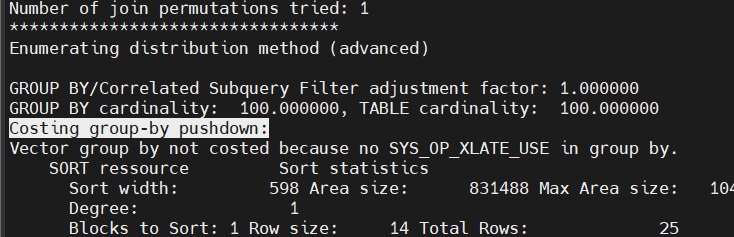
검색어 주변 내용 실시간으로 넘겨가며 보기
|
1
|
$ grep -rl --include="*10053*.trc" 'Costing group-by pushdown:' . | xargs less +/'Costing group-by pushdown:'
|
대소문자 구분 없이 검색
|
1
2
|
$ grep -rn -i --include="*10053*.trc" 'costing group-by pushdown' .
./ORA19DBFS_ora_3070952_10053_1.trc:1170:Costing group-by pushdown:
|
매칭된 단어가 '몇 번'이나 나왔는지 카운트
|
1
2
|
$ grep -c 'Costing group-by pushdown:' ./ORA19DBFS_ora_3070952_10053_1.trc
1
|
alert log 같은 특정 파일에서 ORA-로 시작하는 라인 검색(앞에 공백이 있는 ORA는 제외)(앞 3줄까지 같이 나오게)
|
1
|
$ grep -B 3 '^ORA-' alert_ORA19DBFS.log
|
특정 파일명 검색
|
1
|
$ find . -type f -name '*alert*.log'
|
참조 :
'Linux, Unix > Tip' 카테고리의 다른 글
| Oracle Linux 9 온라인 디스크 증설 방법 (0) | 2026.05.23 |
|---|---|
| Oracle Linux 9 oracle asmlib v3 구성 가이드 (0) | 2026.01.09 |
| 리눅스 쉘로 크리스마스 트리 만들기 (0) | 2025.12.24 |
| IBM AIX 7.2 gui xclock 사용 (0) | 2025.11.09 |
| 오라클 리눅스 8 tmux(Terminal Multiplexer) 사용 가이드 (0) | 2025.10.24 |