
OS 환경 : Oracle Linux 9.6 (64bit)
DB 환경 : Oracle AI Database 19.27, 23.26.1.0.0 ai
방법 : 오라클 19c to 26ai Autoupgrade 이용 업그레이드
오라클 19c to 26ai Autoupgrade 이용 업그레이드
지난 게시글에서는 autoupgrade의 기능인 refreshable pluggable database라는 기능을 이용해서 19c에서 26ai로 이관을 수행했음
참고 : 오라클 19c to 26ai Autoupgrade Refreshable Pluggable Database 이용 업그레이드 ( https://positivemh.tistory.com/1336 )
본문에서는 오라클 19c가 설치된 서버에 26ai silent 설치 및 autoupgrade 툴로 26ai로 업그레이드 하는 방법을 설명함
이때 동일한 서버에 19c와 26ai 인스턴스가 동시에 올라가게됨 이후 autoupgrade를 수행하면 19c를 중지시키고 26ai로 이관을 자동으로 수행함
참고로 서버의 물리 메모리는 10gb로 설정하였음
AutoUpgrade란?
Oracle AutoUpgrade는 업그레이드 시작 전 준비 단계부터 실제 배포, 그리고 업그레이드 후 점검 및 구성 마이그레이션에 이르기까지 전 과정을 자동화하도록 설계된 유틸리티임
- 최신 버전 활용 권장 : AutoUpgrade는 각 Release Update(RU)에 기본 포함($ORACLE_HOME/rdbms/admin)되어 있지만, 오라클은 항상 가장 최신 버전의 autoupgrade.jar를 다운로드하여 사용할 것을 강력히 권장한다고 함
(로그인 없이도 [Database Upgrades and Migrations](https://www.oracle.com/database/upgrades/) 페이지에서 다운로드 가능함)
- 다중 DB 업그레이드 : 단일 설정 파일(Configuration File)을 통해 여러 개의 데이터베이스 배포본을 동시에 업그레이드할 수 있으며, 각 DB 환경에 맞게 커스텀 설정이 가능함
- 지원 에디션 : 본 도구는 Enterprise Edition 및 Standard Edition에서 사용할 수 있음(그 외 에디션은 지원 대상에서 제외)
- OS 통합 단일 도구 : autoupgrade.jar는 Java 기반의 실행 파일로 설계되어 있어, 단 하나의 파일로 Linux, Unix(AIX, Solaris, HP-UX), Windows 등 다양한 OS 환경을 모두 지원함
주요 작동 모드 및 단계
AutoUpgrade는 각 단계별로 데이터베이스의 안정성을 보장하고 관리자의 개입을 최소화함
이슈 방지 (Analyze & Fixup 모드):
- Analyze: 데이터베이스에 대한 읽기 전용 분석을 수행하여 수리(Fix)가 필요한 이슈를 식별함. 이때 운영 중인 DB에 영향을 주지 않고 실행 가능함
- Fixup: 수동 개입이 필요한 부분과 업그레이드 배포 단계에서 자동 수정이 가능한 부분을 구분하여 식별함
업그레이드 간소화 (Deploy & Upgrade 모드):
- Deploy: 설정 파일에 지정된 데이터베이스를 실제로 수정하고 업그레이드함. 이 과정에서 커스텀 스크립트를 호출하여 DB를 구성할 수 있고 대부분의 경우 관리자 개입 없이 자동 수정(Automatic Fixes)을 수행함
사후 점검 및 구성 마이그레이션 (Postupgrade):
- 업그레이드 완료 후 사후 점검을 실시하고 사용자의 커스텀 스크립트나 자동 사후 수정 작업을 수행함
- .ora 파일 점검 : 업그레이드 성공 여부를 최종 확인한 뒤, 소스 홈(Source Home)에 있는 sqlnet.ora, tnsnames.ora, listener.ora 등의 핵심 네트워크 설정 파일을 타겟 홈(Target Home)으로 복사함
이후 새 Oracle Home에서 업그레이드된 DB를 기동하며 프로세스를 마무리함
참고 : Oracle Linux 7.6에 Oracle 18c 에서 Oracle 19c로 AutoUpgrade 가이드 ( https://positivemh.tistory.com/540 )
테스트
1. Autoupgrade 다운로드 및 사전 설정
2. 샘플 데이터 생성
3. 26ai 설치
4. Autoupgrade Analyze
5. Autoupgrade Fixup
6. Autoupgrade Deploy
7. 결과 확인
8. 추가 설정
1. Autoupgrade 다운로드 및 사전 설정
먼저 Autoupgrade 툴 최신 버전 다운로드
아래 링크 또는 AutoUpgrade Tool(KB123450)에서 다운로드 가능
https://www.oracle.com/database/upgrades
oracle 유저 홈에 저장
|
1
2
|
# chown oracle:dba autoupgrade.jar
# mv autoupgrade.jar /home/oracle/
|
Autoupgrade 버전 확인
|
1
2
3
4
5
6
7
8
9
10
|
$ java -jar autoupgrade.jar -version
build.version 26.2.260205
build.date 2026/02/05 04:36:27 +0000
build.hash 226a8557b
build.hash_date 2026/02/04 13:52:42 +0000
build.supported_target_versions 12.2,18,19,21,23
build.type production
build.label (HEAD, tag: v26.2, origin/rdbms_19.31)
build.MOS_NOTE 2485457.1
build.MOS_LINK https://support.oracle.com/epmos/faces/DocumentDisplay?id=2485457.1
|
26.2 버전임
2. 샘플 데이터 생성
db 상태 확인
|
1
2
3
4
5
6
|
$ sqlplus / as sysdba
SQL> select instance_name, version, status from v$instance;
INSTANCE_NAME VERSION STATUS
---------------- ----------------- ------------
ORA19FS 19.0.0.0.0 OPEN
|
현재 19c가 기동중임
샘플 테이블 생성 및 데이터 추가
|
1
2
3
4
5
6
7
8
9
10
11
|
SQL> create table sample_tbl1 (id number, name varchar2(30));
Table created.
SQL> insert into sample_tbl1 select object_id, object_name from dba_objects;
23913 rows created.
SQL> commit;
Commit complete.
|
3. 26ai 설치
preinstall rpm 설치
공식홈페이지에서 preinstall rpm 다운로드 후 서버에 업로드
https://yum.oracle.com/repo/OracleLinux/OL9/appstream/x86_64/getPackage/oracle-ai-database-preinstall-26ai-1.0-1.el9.x86_64.rpm
또는 curl로 서버에 직접 다운로드
|
1
2
3
4
5
6
7
8
9
10
11
12
13
14
15
16
17
18
19
20
21
22
23
24
25
26
27
28
29
30
31
32
33
34
35
36
37
38
39
40
41
42
43
44
45
46
47
48
49
50
51
52
53
|
# wget https://yum.oracle.com/repo/OracleLinux/OL9/appstream/x86_64/getPackage/oracle-ai-database-preinstall-26ai-1.0-1.el9.x86_64.rpm
# dnf -y localinstall oracle-ai-database-preinstall-26ai-1.0-1.el9.x86_64.rpm
Oracle Linux 9 BaseOS Latest (x86_64) 9.4 kB/s | 4.3 kB 00:00
Oracle Linux 9 BaseOS Latest (x86_64) 17 MB/s | 106 MB 00:06
Oracle Linux 9 Application Stream Packages (x86_64) 9.2 kB/s | 4.5 kB 00:00
Oracle Linux 9 Application Stream Packages (x86_64) 16 MB/s | 82 MB 00:05
Oracle Linux 9 UEK Release 8 (x86_64) 8.0 kB/s | 3.5 kB 00:00
Oracle Linux 9 UEK Release 8 (x86_64) 10 MB/s | 27 MB 00:02
HTTP request sent, awaiting response... 200 OK
Length: 35302 (34K) [application/x-rpm]
Saving to: ‘oracle-ai-database-preinstall-26ai-1.0-1.el9.x86_64.rpm’
oracle-ai-database-preinstall-26ai-1.0-1. 100%[==================================================================================>] 34.47K --.-KB/s in 0.05s
2026-02-26 14:47:39 (726 KB/s) - ‘oracle-ai-database-preinstall-26ai-1.0-1.el9.x86_64.rpm’ saved [35302/35302]
Last metadata expiration check: 0:00:17 ago on Thu 26 Feb 2026 02:47:23 PM KST.
Dependencies resolved.
=====================================================================================================================================================================
Package Architecture Version Repository Size
=====================================================================================================================================================================
Installing:
oracle-ai-database-preinstall-26ai x86_64 1.0-1.el9 @commandline 34 k
Installing dependencies:
compat-openssl11 x86_64 1:1.1.1k-5.el9_6.1 ol9_appstream 1.5 M
Transaction Summary
=====================================================================================================================================================================
Install 2 Packages
Total size: 1.5 M
Total download size: 1.5 M
Installed size: 3.8 M
Downloading Packages:
compat-openssl11-1.1.1k-5.el9_6.1.x86_64.rpm 3.4 MB/s | 1.5 MB 00:00
---------------------------------------------------------------------------------------------------------------------------------------------------------------------
Total 3.4 MB/s | 1.5 MB 00:00
Running transaction check
Transaction check succeeded.
Running transaction test
Transaction test succeeded.
Running transaction
Preparing : 1/1
Installing : compat-openssl11-1:1.1.1k-5.el9_6.1.x86_64 1/2
Installing : oracle-ai-database-preinstall-26ai-1.0-1.el9.x86_64 2/2
Running scriptlet: oracle-ai-database-preinstall-26ai-1.0-1.el9.x86_64 2/2
Verifying : compat-openssl11-1:1.1.1k-5.el9_6.1.x86_64 1/2
Verifying : oracle-ai-database-preinstall-26ai-1.0-1.el9.x86_64 2/2
Installed:
compat-openssl11-1:1.1.1k-5.el9_6.1.x86_64 oracle-ai-database-preinstall-26ai-1.0-1.el9.x86_64
Complete!
|
openssl11 패키지가 추가로 설치됨
오라클 설치파일 업로드 및 권한 부여
|
1
2
|
$ ls -al /app/oracle/media/LINUX.X64_2326100_db_home.zip
-rw-r--r-- 1 oracle dba 2406058543 Feb 26 14:50 /app/oracle/media/LINUX.X64_2326100_db_home.zip
|
26ai용 env 적용
|
1
2
3
4
5
|
$ export ORACLE_HOME=$ORACLE_BASE/product/26ai
$ export ORACLE_SID=ORA26DBFS
$ export DB_UNIQUE_NAME=ORA26DBFS
$ export PATH=$ORACLE_HOME/bin:$ORACLE_HOME/OPatch:$PATH
$ export CV_ASSUME_DISTID=OL9
|
Oracle Software(엔진) 설치
오라클 26ai 엔진 압축 해제
|
1
2
3
4
5
|
$ mkdir -p $ORACLE_HOME
$ cd $ORACLE_HOME
$ pwd
/app/oracle/product/26ai
$ unzip -q /app/oracle/media/LINUX.X64_2326100_db_home.zip
|
rsp 파일 생성
|
1
2
3
4
5
6
7
8
9
10
11
12
13
14
15
|
$ cat /home/oracle/db_install_26ai.rsp
oracle.install.responseFileVersion=/oracle/install/rspfmt_dbinstall_response_schema_v23.0.0
installOption=INSTALL_DB_SWONLY
UNIX_GROUP_NAME=dba
INVENTORY_LOCATION=/app/oraInventory
ORACLE_HOME=/app/oracle/product/26ai
ORACLE_BASE=/app/oracle
installEdition=EE
OSDBA=dba
OSOPER=dba
OSBACKUPDBA=dba
OSDGDBA=dba
OSKMDBA=dba
OSRACDBA=dba
executeRootScript=false
|
runInstaller silent 모드로 수행
|
1
2
3
4
5
6
7
8
9
10
11
12
13
14
15
16
17
18
|
$ /app/oracle/product/26ai/runInstaller -ignorePrereq -waitforcompletion -silent \
-responseFile /home/oracle/db_install_26ai.rsp
Launching Oracle AI Database Setup Wizard...
The response file for this session can be found at:
/app/oracle/product/26ai/install/response/db_2026-02-26_03-03-43PM.rsp
You can find the log of this install session at:
/app/oraInventory/logs/InstallActions2026-02-26_03-03-43PM/installActions2026-02-26_03-03-43PM.log
As a root user, run the following script(s):
1. /app/oracle/product/26ai/root.sh
Run /app/oracle/product/26ai/root.sh on the following nodes:
[ora19]
Successfully Setup Software.
|
root 계정으로 스크립트 수행
|
1
2
3
4
5
6
7
8
9
10
11
12
13
14
15
16
|
# /app/oracle/product/26ai/root.sh
Check /app/oracle/product/26ai/install/root_ora19_2026-02-26_15-20-57-570482280.log for the output of root script
# cat /app/oracle/product/26ai/install/root_ora19_2026-02-26_15-20-57-570482280.log
Performing root user operation.
The following environment variables are set as:
ORACLE_OWNER= oracle
ORACLE_HOME= /app/oracle/product/26ai
Copying dbhome to /usr/local/bin ...
Copying oraenv to /usr/local/bin ...
Copying coraenv to /usr/local/bin ...
Entries will be added to the /etc/oratab file as needed by
Database Configuration Assistant when a database is created
Finished running generic part of root script.
Now product-specific root actions will be performed.
|
리스너 설정
리스너 rsp 파일 생성
|
1
|
$ grep -vE '^\s*(#|$)' $ORACLE_HOME/assistants/netca/netca.rsp > ~oracle/netca.rsp
|
26ai 리스너 생성 및 확인 및 확인
|
1
2
3
4
5
6
7
8
9
10
11
12
13
14
15
|
$ netca -silent -responsefile ~/netca.rsp
Parsing command line arguments:
Parameter "silent" = true
Parameter "responsefile" = /home/oracle/netca.rsp
Done parsing command line arguments.
Oracle Net Services Configuration:
Profile configuration complete.
Oracle Net Listener Startup:
Running Listener Control:
/app/oracle/product/26ai/bin/lsnrctl start LISTENER
Listener Control complete.
Listener started successfully.
Listener configuration complete.
Oracle Net Services configuration successful. The exit code is 0
|
26ai 리스너 확인
|
1
2
3
4
5
6
7
8
9
10
11
12
13
14
15
16
17
18
19
20
21
22
23
|
$ lsnrctl status
LSNRCTL for Linux: Version 23.26.1.0.0 - Production on 26-FEB-2026 15:34:40
Copyright (c) 1991, 2026, Oracle. All rights reserved.
Connecting to (DESCRIPTION=(ADDRESS=(PROTOCOL=TCP)(HOST=ora19)(PORT=1522)))
STATUS of the LISTENER
------------------------
Alias LISTENER
Version TNSLSNR for Linux: Version 23.26.1.0.0 - Production
Start Date 26-FEB-2026 15:34:36
Uptime 0 days 0 hr. 0 min. 3 sec
Trace Level off
Security ON: Local OS Authentication
SNMP OFF
Listener Parameter File /app/oracle/product/26ai/network/admin/listener.ora
Listener Log File /app/oracle/diag/tnslsnr/ora19/listener/alert/log.xml
Listening Endpoints Summary...
(DESCRIPTION=(ADDRESS=(PROTOCOL=tcp)(HOST=ora19)(PORT=1522)))
(DESCRIPTION=(ADDRESS=(PROTOCOL=ipc)(KEY=EXTPROC1522)))
The listener supports no services
The command completed successfullyxxxxxxxxxxxxx
|
기존에 1521 포트를 사용중인 리스너가 있었기 때문에 자동으로 1522 포트로 생성됨
(또는 기존 19c 리스너를 미리 내려두면 1521로 생성가능함)
dbca용 템플릿 수정(컴포넌트 비활성화)
|
1
2
3
4
5
6
7
8
9
10
11
12
13
14
15
16
17
18
19
20
21
22
23
24
25
26
27
28
29
30
31
32
33
34
35
36
|
$ cd /app/oracle/product/26ai/assistants/dbca/templates
$ cp New_Database.dbt New_Database.dbtbak
$ vi New_Database.dbt
#기존
<DatabaseTemplate name="New Database" description="" version="23.0.0.0.0">
<CommonAttributes>
<option name="OMS" value="false" includeInPDBs="false"/>
<option name="JSERVER" value="true" includeInPDBs="true"/>
<option name="SPATIAL" value="true" includeInPDBs="true"/>
<option name="ORACLE_TEXT" value="true" includeInPDBs="true">
<tablespace id="SYSAUX"/>
</option>
<option name="CWMLITE" value="true" includeInPDBs="true">
<tablespace id="SYSAUX"/>
</option>
<option name="SAMPLE_SCHEMA" value="false" includeInPDBs="false"/>
<option name="DV" value="false" includeInPDBs="false"/>
</CommonAttributes>
...
#변경
<DatabaseTemplate name="New Database" description="" version="23.0.0.0.0">
<CommonAttributes>
<option name="OMS" value="false" includeInPDBs="false"/>
<option name="JSERVER" value="false" includeInPDBs="false"/>
<option name="SPATIAL" value="false" includeInPDBs="false"/>
<option name="ORACLE_TEXT" value="false" includeInPDBs="false">
<tablespace id="SYSAUX"/>
</option>
<option name="CWMLITE" value="false" includeInPDBs="false">
<tablespace id="SYSAUX"/>
</option>
<option name="SAMPLE_SCHEMA" value="false" includeInPDBs="false"/>
<option name="DV" value="false" includeInPDBs="false"/>
</CommonAttributes>
..
|
상단 CommonAttributes 부분만 false로 수정
dbca 수행
|
1
2
3
4
5
6
7
8
9
10
11
12
13
14
15
16
17
18
19
20
21
22
23
24
25
26
27
28
29
30
31
32
33
34
35
36
37
38
39
40
41
42
43
44
45
46
47
48
49
50
51
52
53
54
55
56
57
58
59
60
|
$ dbca -silent -createDatabase \
-gdbName ORA26DBFS \
-templateName New_Database.dbt \
-scriptDest /app/oracle/admin/ORA26DBFS/script \
-databaseConfigType SINGLE \
-createAsContainerDatabase TRUE \
-numberOfPDBs 0 \
-datafileDestination /app/oracle/oradata \
-storageType FS \
-redoLogFileSize 200 \
-characterSet KO16MSWIN949 \
-nationalCharacterSet AL16UTF16 \
-listeners LISTENER \
-databaseType MULTIPURPOSE \
-memoryMgmtType AUTO_SGA \
-totalMemory 1700m \
-sysPassword "oracle" \
-systemPassword "oracle" \
-pdbAdminPassword "oracle"
[WARNING] [DBT-06208] The 'SYS' password entered does not conform to the Oracle recommended standards.
CAUSE:
a. Oracle recommends that the password entered should be at least 8 characters in length, contain at least 1 uppercase character, 1 lower case character and 1 digit [0-9].
b.The password entered is a keyword that Oracle does not recommend to be used as password
ACTION: Specify a strong password. If required refer Oracle documentation for guidelines.
[WARNING] [DBT-06208] The 'SYSTEM' password entered does not conform to the Oracle recommended standards.
CAUSE:
a. Oracle recommends that the password entered should be at least 8 characters in length, contain at least 1 uppercase character, 1 lower case character and 1 digit [0-9].
b.The password entered is a keyword that Oracle does not recommend to be used as password
ACTION: Specify a strong password. If required refer Oracle documentation for guidelines.
Prepare for db operation
8% complete
Creating and starting Oracle instance
11% complete
12% complete
17% complete
Creating database files
18% complete
25% complete
Creating data dictionary views
28% complete
33% complete
35% complete
38% complete
50% complete
Creating cluster database views
52% complete
67% complete
Completing Database Creation
72% complete
74% complete
75% complete
Executing Post Configuration Actions
100% complete
Database creation complete. For details check the logfiles at:
/app/oracle/cfgtoollogs/dbca/ORA26DBFS.
Database Information:
Global Database Name:ORA26DBFS
System Identifier(SID):ORA26DBFS
Look at the log file "/app/oracle/cfgtoollogs/dbca/ORA26DBFS/ORA26DBFS1.log" for further details.
|
설치 완료됨
4. Autoupgrade Analyze
autoupgrade용 설정 파일 생성
|
1
2
3
4
5
6
7
8
9
10
11
12
|
$ vi /home/oracle/upg26.cfg
# Global Parameters
global.global_log_dir=/home/oracle/autoupgrade/log
# Database info
upg1.source_home=/app/oracle/product/19c
upg1.target_home=/app/oracle/product/26ai
upg1.sid=ORA19FS
upg1.target_cdb=ORA26DBFS
upg1.target_pdb_copy_option=file_name_convert=('/app/oracle/oradata/ORA19FS', '/app/oracle/oradata/ORA26DBFS/ORA19FS')
upg1.restoration=no
upg1.catctl_options=-t
|
upg1.target_pdb_copy_option=file_name_convert는 소스DB와 타겟DB의 설정에 맞게 기입해야함
26ai 접속을 위해 .bash_profile 수정
|
1
2
3
4
5
6
7
8
9
10
11
12
13
14
15
16
17
18
|
# su - oracle
$ vi .bash_profile
export ORACLE_BASE=/app/oracle
#export ORACLE_HOME=$ORACLE_BASE/product/19c; #19c 설정 주석 또는 제거
#export ORACLE_SID=ORA19FS #19c 설정 주석 또는 제거
#export DB_UNIQUE_NAME=ORA19FS #19c 설정 주석 또는 제거
export ORACLE_HOME=$ORACLE_BASE/product/26ai; #26ai 설정 삽입
export ORACLE_SID=ORA26DBFS #26ai 설정 삽입
export DB_UNIQUE_NAME=ORA26DBFS #26ai 설정 삽입
export PATH=$PATH:$ORACLE_HOME/bin:$ORACLE_HOME/OPatch
export LD_LIBRARY_PATH=$ORACLE_HOME/lib:/lib:/usr/lib;
export CLASSPATH=$ORACLE_HOME/jlib:$ORACLE_HOME/rdbms/jlib;
#alias
stty erase ^H
alias ss="sqlplus / as sysdba"
alias sysc='sqlplus sys/oracle@localhost:1521/ORA26DBFS as sysdba'
alias sysp='sqlplus sys/oracle@localhost:1521/ORA19FS as sysdba'
|
적용
|
1
|
$ . ./.bash_profile
|
업그레이드 대상 CDB의 상태 확인
|
1
2
3
4
5
6
7
8
|
$ sqlplus / as sysdba
col name for a20
select name, open_mode from v$containers;
NAME OPEN_MODE
-------------------- ----------
CDB$ROOT READ WRITE
PDB$SEED READ ONLY
|
cdb만 존재하고 pdb는 존재하지 않음(pdb$seed는 제외)
Autoupgrade Analyze 모드 수행
|
1
2
3
4
5
6
7
8
9
10
11
12
13
14
15
|
$ java -jar autoupgrade.jar -config /home/oracle/upg26.cfg -mode analyze
AutoUpgrade 26.2.260205 launched with default internal options
Processing config file ...
Note: The following parameters specified in the configuration file have not been used:
upg1.catctl_option
Be sure that each parameter is spelled correctly and applies to the utility
requested, as misspelled or unknown parameters are ignored by AutoUpgrade.
For supported parameters, see section "AutoUpgrade Utility Configuration Files
Parameters and Options" in the Oracle Database Upgrade Guide.
+--------------------------------+
| Starting AutoUpgrade execution |
+--------------------------------+
1 Non-CDB(s) will be analyzed
Type 'help' to list console commands
|
접속됨
30초마다 상태 업데이트 되게끔 설정
|
1
2
3
4
5
6
7
8
9
10
11
12
13
14
15
16
17
18
19
|
upg> lsj -a 30
upg> +----+-------+---------+---------+-------+----------+-------+----------------+
|Job#|DB_NAME| STAGE|OPERATION| STATUS|START_TIME|UPDATED| MESSAGE|
+----+-------+---------+---------+-------+----------+-------+----------------+
| 100|ORA19FS|PRECHECKS|EXECUTING|RUNNING| 07:52:50| 3s ago|Executing Checks|
+----+-------+---------+---------+-------+----------+-------+----------------+
Total jobs 1
The command lsj is running every 30 seconds. PRESS ENTER TO EXIT
Job 100 completed
------------------- Final Summary --------------------
Number of databases [ 1 ]
Jobs finished [1]
Jobs failed [0]
Please check the summary report at:
/home/oracle/autoupgrade/log/cfgtoollogs/upgrade/auto/status/status.html
/home/oracle/autoupgrade/log/cfgtoollogs/upgrade/auto/status/status.log
|
완료됨
리포트 확인
|
1
2
3
4
5
6
7
8
9
10
11
12
13
14
15
16
17
18
19
20
21
|
$ cat /home/oracle/autoupgrade/log/cfgtoollogs/upgrade/auto/status/status.log
==========================================
Autoupgrade Summary Report
==========================================
[Date] Wed Mar 04 07:53:11 KST 2026
[Number of Jobs] 1
==========================================
[Job ID] 100
==========================================
[DB Name] ORA19FS
[Version Before Upgrade] 19.28.0.0.0
[Version After Upgrade] 23.26.1.0.0
------------------------------------------
[Stage Name] PRECHECKS
[Status] SUCCESS
[Start Time] 2026-03-04 07:52:50
[Duration] 0:00:21
[Log Directory] /home/oracle/autoupgrade/log/ORA19FS/100/prechecks
[Detail] /home/oracle/autoupgrade/log/ORA19FS/100/prechecks/ora19fs_preupgrade.log
Check passed and no manual intervention needed
------------------------------------------
|
큰 문제가 없음
detail 확인
|
1
2
3
4
5
6
7
8
9
10
11
12
13
14
15
16
17
18
19
20
21
22
23
24
25
26
27
28
29
30
31
32
33
34
35
36
37
38
39
40
41
42
43
44
45
46
47
48
49
50
51
52
53
54
55
56
57
58
59
60
61
62
63
64
65
66
67
68
69
70
71
72
73
74
75
76
77
78
79
80
81
82
83
84
85
86
87
88
89
90
91
92
93
94
95
96
97
98
99
100
101
102
103
104
105
106
107
108
109
110
111
112
113
114
115
116
117
118
119
120
121
122
123
124
125
126
127
128
129
130
131
132
133
134
135
136
137
138
139
140
141
142
143
144
145
146
147
148
149
150
151
152
153
154
155
156
157
158
159
160
161
162
163
164
165
166
167
168
169
170
171
172
173
174
175
176
177
178
179
180
181
182
183
184
185
186
187
188
189
190
191
192
193
194
195
196
197
198
199
200
201
202
203
204
205
206
207
208
209
210
211
212
213
214
215
216
217
218
219
220
221
222
223
224
225
226
227
228
229
230
231
232
233
234
235
236
237
238
239
240
241
242
243
244
245
246
247
248
249
250
251
252
253
254
255
256
257
258
259
260
261
262
263
264
265
266
267
268
269
270
271
272
273
274
275
276
277
278
279
280
281
282
283
284
285
286
287
288
289
290
291
292
293
294
295
296
297
298
299
300
301
302
303
304
305
306
307
308
309
310
311
312
313
314
315
316
317
318
319
320
321
322
323
324
325
326
327
328
329
330
331
332
333
334
335
336
337
338
339
340
341
342
343
344
345
346
347
348
349
350
351
352
353
354
355
356
|
$ cat /home/oracle/autoupgrade/log/ORA19FS/100/prechecks/ora19fs_preupgrade.log
Report generated by AutoUpgrade 26.2.260205 (#226a8557b) on 2026-03-04 07:53:11
Upgrade-To version: 23.0.0.0.0
=======================================
Status of the database prior to upgrade
=======================================
Database Name: ORA19FS
Container Name: ORA19FS
Container ID: 0
Version: 19.28.0.0.0
DB Patch Level: UNKNOWN
Compatible: 19.0.0
Blocksize: 8192
Platform: Linux x86 64-bit
Timezone File: 44
Database log mode: NOARCHIVELOG
Readonly: false
Edition: EE
Oracle Component Upgrade Action Current Status
---------------- -------------- --------------
Oracle Server [to be upgraded] VALID
Oracle Workspace Manager [to be upgraded] VALID
Real Application Clusters [to be upgraded] OPTION OFF
Oracle XML Database [to be upgraded] VALID
*
* ALL Components in This Database Registry:
*
Component Current Current Original Previous Component
CID Version Status Version Version Schema
---------- ----------- ----------- ----------- ----------- ------------
CATALOG 19.28.0.0.0 VALID 19.28.0.0.0 SYS
CATPROC 19.28.0.0.0 VALID 19.28.0.0.0 SYS
OWM 19.28.0.0.0 VALID 19.28.0.0.0 WMSYS
RAC 19.28.0.0.0 OPTION OFF 19.28.0.0.0 SYS
XDB 19.28.0.0.0 VALID 19.28.0.0.0 XDB
==============
BEFORE UPGRADE
==============
REQUIRED ACTIONS
================
None
RECOMMENDED ACTIONS
===================
1.
CheckName FixUp Available
PARAM_VALUES_IN_MEM_ONLY NO
Severity Stage
WARNING PRECHECKS
Review below list of parameters set in memory only and for the ones that
are intended to be permanent:
1. Save these settings in respective SPFILE.
2. Run AutoUpgrade in ANALYZE mode so that parameters can get reflected
in interim pfiles created by the tool.
The parameters with values that are in memory only are:
Instance Parameter Memory Value Parameter File Value
---------- ------------ ----------------- --------------------
Instance N Parameter Memory value Parameter File value
ame
ora19fs sga_target 1543503872 1531969536
For database initialization parameter values that are not in the
database's initialization parameter file (pfile/spfile), note that the
values in memory only will be lost on database shutdown in the current
Oracle home prior to upgrading. Hence, these values will not be used in
the database upgrade unless they are recorded in the parameter file.
Found at least one parameter with a value in memory that is not in the
database's initialization parameter file.
2.
CheckName FixUp Available
TARGET_CDB_COMPATIBILITY_WARNINGS NO
Severity Stage
WARNING PRECHECKS
Review each warning violation reported and take action as needed. Note
that when AutoUpgrade is run in deploy mode, AutoUpgrade will proceed
regardless of the presence of any un-resolved warning violations in
PDB_PLUG_IN_VIOLATIONS.
Before plugging in database ORA19FS as a PDB of CDB ORA26DBFS, all
violations in the PDB_PLUG_IN_VIOLATIONS view with type='WARNING' should
be reviewed for their potential impact.
The following plugin violations with type='WARNING' are found:
ORA19FS 1 WARNING PENDING CDB parameter use_large_pages mismatch:
Previous 'ONLY' Current 'TRUE' Please check the parameter in the current
CDB
ORA19FS 1 WARNING PENDING CDB parameter sga_target mismatch: Previous
1472M Current 2992M Please check the parameter in the current CDB
ORA19FS 1 WARNING PENDING CDB parameter compatible mismatch: Previous
'19.0.0' Current '23.6.0' Please check the parameter in the current CDB
ORA19FS 1 WARNING PENDING Downgrade will not be allowed after plugin as
compatible parameter of the PDB (19.0.0) is lower than the compatible
parameter of the current CDB (23.6.0).
ORA19FS 1 WARNING PENDING CDB parameter pga_aggregate_target mismatch:
Previous 487M Current 997M Please check the parameter in the current CDB
ORA19FS 1 WARNING PENDING Oracle opatch mismatch: opatch 37962946 is
missing in the CDB. Install the Oracle opatch in the CDB.
ORA19FS 1 WARNING PENDING Oracle opatch mismatch: opatch 37960098 is
missing in the CDB. Install the Oracle opatch in the CDB.
INFORMATION ONLY
================
3.
CheckName FixUp Available
PARAMETER_DEPRECATED NO
Severity Stage
INFO PRECHECKS
Consider removing the following deprecated initialization parameters.
These deprecated parameters probably will be obsolete in a future release.
Deprecated Parameter
--------------------
Parameter
audit_file_dest
audit_trail
4.
CheckName FixUp Available
MANDATORY_UPGRADE_CHANGES YES
Severity Stage
INFO PRECHECKS
(AUTOFIXUP) Mandatory changes are applied automatically in the
during_upgrade_pfile_dbname.ora file. Some of these changes maybe present
in the after_upgrade_pfile_dbname.ora file. The
during_upgrade_pfile_dbname.ora is used to start the database in upgrade
mode. The after_upgrade_pfile_dbname.ora is used to start the database
once the upgrade has completed successfully.
Mandatory changes are required to perform the upgrade. These changes are
implemented in the during_ and after_upgrade_pfile_dbname.ora files.
Parameter
---------
Parameter
local_listener=remove
cluster_database=FALSE
5.
CheckName FixUp Available
DATAPATCH_TIMEOUT_SETTINGS YES
Severity Stage
INFO PRECHECKS
(AUTOFIXUP) Timeout changes are applied automatically in the
during_upgrade_pfile_dbname.ora file. The during_upgrade_pfile_dbname.ora
is used to start the database in upgrade mode.
Parameter _xt_preproc_timeout controls the timeout threshold when reading
the Oracle inventory. Setting a timeout value that is not too small can
enable Datapatch to read the Oracle inventory successfully within that
timeframe.
Parameter
---------
Parameter
_xt_preproc_timeout=300
6.
CheckName FixUp Available
RMAN_RECOVERY_VERSION NO
Severity Stage
INFO PRECHECKS
Check the Oracle Backup and Recovery User's Guide for information on how
to manage an RMAN recovery catalog schema.
It is good practice to have the catalog schema the same or higher version
than the RMAN client version you are using.
If you are using a version of the recovery catalog schema that is older
than that required by the RMAN client version, then you must upgrade the
catalog schema.
7.
CheckName FixUp Available
COMPONENT_INFO NO
Severity Stage
INFO PRECHECKS
Here are ALL the components in this database registry:
Review the information before upgrading.
Component Current Current Original Previous Component
CID Version Status Version Version Schema
--------- ----------- ----------- ----------- ----------- -----------
Component Current Ver Current Sta Original Ve Previous Ve Component S
CID sion tus rsion rsion chema
CATALOG 19.28.0.0.0 VALID 19.28.0.0.0 SYS
CATPROC 19.28.0.0.0 VALID 19.28.0.0.0 SYS
OWM 19.28.0.0.0 VALID 19.28.0.0.0 WMSYS
RAC 19.28.0.0.0 OPTION OFF 19.28.0.0.0 SYS
XDB 19.28.0.0.0 VALID 19.28.0.0.0 XDB
8.
CheckName FixUp Available
INVALID_ORA_OBJ_INFO NO
Severity Stage
INFO PRECHECKS
Here is a count of invalid objects by Oracle-maintained users:
Review the information before upgrading.
Oracle-Maintained User Name Number of INVALID Objects
--------------------------- -------------------------
Oracle-Maintained User Name Number of INVALID Objects
None None
9.
CheckName FixUp Available
INVALID_APP_OBJ_INFO NO
Severity Stage
INFO PRECHECKS
Here is a count of invalid objects by Application users:
Review the information before upgrading.
Application User Name Number of INVALID Objects
--------------------------- -------------------------
Application User Name Number of INVALID Objects
None None
10.
CheckName FixUp Available
EM_EXPRESS_PRESENT NO
Severity Stage
INFO PRECHECKS
No action needed. Enterprise Manager Database Express will be removed by
the upgrade process.
Starting with Oracle Database 23, Enterprise Manager Database Express is
de-supported. Any EM Express specific files and objects will removed from
your database during the upgrade. EM Express ports will no longer be
opened to accept any HTTP request. Roles EM_EXPRESS_BASIC and
EM_EXPRESS_ALL as well as "EM Express Connect" privilege will be removed.
If user is to downgrade to a release earlier than 23, EM Express will be
restored, including all of its files and objects, as well as the
EM_EXPRESS_BASIC and EM_EXPRESS_ALL roles and "EM Express Connect"
privilege. However, any specific non out-of-box user grants and audit
policies of these roles and privilege will not be restored upon downgrade.
Enterprise Manager Database Express is present. The database has EM
Express files and objects.
=============
AFTER UPGRADE
=============
REQUIRED ACTIONS
================
None
RECOMMENDED ACTIONS
===================
11.
CheckName FixUp Available
TIMESTAMP_MISMATCH YES
Severity Stage
WARNING POSTCHECKS
(AUTOFIXUP) Recompile the objects with timestamp mismatch. Refer to MOS
note 781959.1 for more details.
Timestamp of dependent objects must coincide with the timestamp of parent
objects.
There are objects whose timestamp are mismatched with its parent objects.
12.
CheckName FixUp Available
POST_DICTIONARY YES
Severity Stage
RECOMMEND POSTCHECKS
(AUTOFIXUP) Gather dictionary statistics after the upgrade using the
command:
EXECUTE DBMS_STATS.GATHER_DICTIONARY_STATS;
Dictionary statistics provide essential information to the Oracle
optimizer to help it find efficient SQL execution plans. After a database
upgrade, statistics need to be re-gathered as there can now be tables
that have significantly changed during the upgrade or new tables that do
not have statistics gathered yet.
Oracle recommends gathering dictionary statistics after upgrade.
13.
CheckName FixUp Available
POST_FIXED_OBJECTS NO
Severity Stage
RECOMMEND POSTCHECKS
Gather statistics on fixed objects after the upgrade and when there is a
representative workload on the system using the command:
EXECUTE DBMS_STATS.GATHER_FIXED_OBJECTS_STATS;
Fixed object statistics provide essential information to the Oracle
optimizer to help it find efficient SQL execution plans. Those statistics
are specific to the Oracle Database release that generates them, and can
be stale upon database upgrade.
For information on managing optimizer statistics, refer to the 19.0.0.0
Oracle Database Upgrade Guide.
Oracle recommends gathering fixed object statistics after upgrade. This
recommendation is given for all preupgrade runs.
14.
CheckName FixUp Available
POST_RECOMPILE YES
Severity Stage
RECOMMEND POSTCHECKS
(AUTOFIXUP) To recompile invalid objects manually in ALL schemas, use
$ORACLE_HOME/rdbms/admin/utlrp.sql
Invalid database objects need to be recompiled after a database is
upgraded. Note that starting with Release 12.2.0.1 and later, AutoUpgrade
recompiles only invalid objects in Oracle-maintained schemas and defers
recompilation of invalid application objects post upgrade to users.
There are 0 invalid objects in Oracle-maintained schemas and 0 invalid
objects in application schemas after upgrade.
|
내용을 보면 업그레이드 수행 전 prefixups 해야 할 목록들이 있고 업그레이드 후 postfixups 해야 할 목록들이 존재함
5. Autoupgrade Fixup
Fixup 해야할게 있으면 수행
|
1
2
3
4
5
6
7
8
9
10
11
12
13
14
15
16
17
18
19
20
21
22
23
24
25
|
$ java -jar autoupgrade.jar -config /home/oracle/upg26.cfg -mode fixups
AutoUpgrade 26.2.260205 launched with default internal options
Processing config file ...
Note: The following parameters specified in the configuration file have not been used:
upg1.catctl_option
Be sure that each parameter is spelled correctly and applies to the utility
requested, as misspelled or unknown parameters are ignored by AutoUpgrade.
For supported parameters, see section "AutoUpgrade Utility Configuration Files
Parameters and Options" in the Oracle Database Upgrade Guide.
+--------------------------------+
| Starting AutoUpgrade execution |
+--------------------------------+
1 Non-CDB(s) will be processed
Type 'help' to list console commands
upg> Job 101 completed
------------------- Final Summary --------------------
Number of databases [ 1 ]
Jobs finished [1]
Jobs failed [0]
Please check the summary report at:
/home/oracle/autoupgrade/log/cfgtoollogs/upgrade/auto/status/status.html
/home/oracle/autoupgrade/log/cfgtoollogs/upgrade/auto/status/status.log
|
상태 확인
|
1
2
3
4
5
6
7
8
9
10
11
12
13
14
15
16
17
18
19
20
21
22
23
24
25
26
27
28
|
$ cat /home/oracle/autoupgrade/log/cfgtoollogs/upgrade/auto/status/status.log
==========================================
Autoupgrade Summary Report
==========================================
[Date] Wed Mar 04 08:00:16 KST 2026
[Number of Jobs] 1
==========================================
[Job ID] 101
==========================================
[DB Name] ORA19FS
[Version Before Upgrade] 19.28.0.0.0
[Version After Upgrade] 23.26.1.0.0
------------------------------------------
[Stage Name] PRECHECKS
[Status] SUCCESS
[Start Time] 2026-03-04 07:59:51
[Duration] 0:00:13
[Log Directory] /home/oracle/autoupgrade/log/ORA19FS/101/prechecks
[Detail] /home/oracle/autoupgrade/log/ORA19FS/101/prechecks/ora19fs_preupgrade.log
Check passed and no manual intervention needed
------------------------------------------
[Stage Name] PREFIXUPS
[Status] SUCCESS
[Start Time] 2026-03-04 08:00:05
[Duration] 0:00:11
[Log Directory] /home/oracle/autoupgrade/log/ORA19FS/101/prefixups
[Detail] /home/oracle/autoupgrade/log/ORA19FS/101/prefixups/prefixups.html
------------------------------------------
|
prefixups.log 확인(html)
/home/oracle/autoupgrade/log/ORA19FS/101/prefixups/prefixups.html
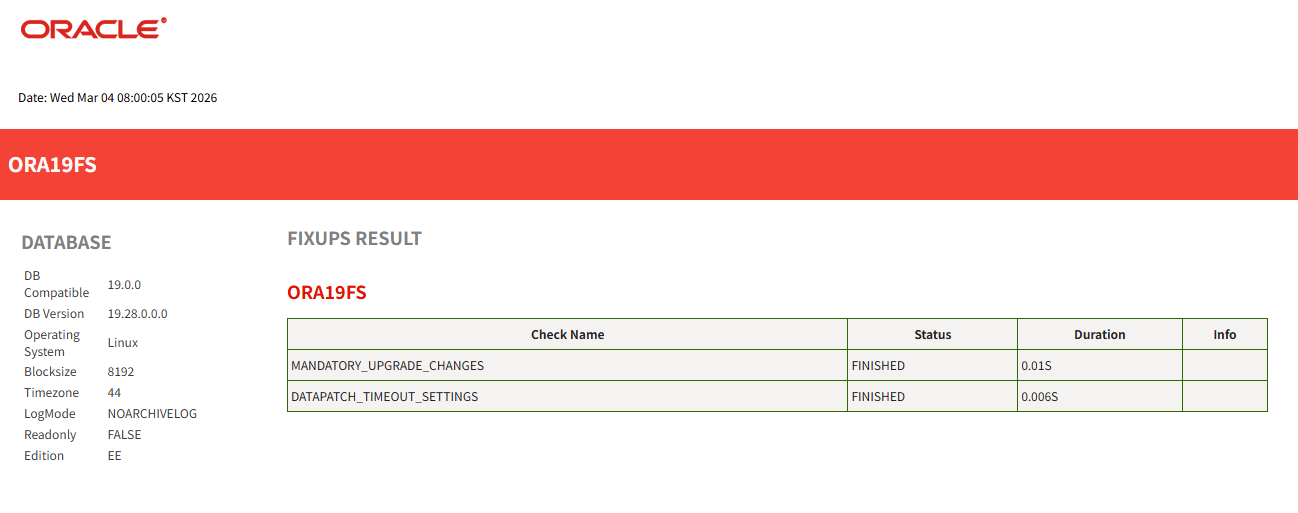
prefixups.log 확인(text)
|
1
2
3
4
5
6
7
8
9
10
11
12
13
14
15
16
17
18
19
20
21
22
23
24
25
26
27
28
29
30
31
32
33
34
35
36
37
38
39
40
41
42
43
44
45
46
47
48
|
$ cat /home/oracle/autoupgrade/log/ORA19FS/101/prefixups/prefixups_ora19fs.log
2026-03-04 08:00:05.187 INFO [75] Starting log for ORA19FS - Utilities.createLogger#1538
2026-03-04 08:00:05.327 INFO [439] Running fixup [MANDATORY_UPGRADE_CHANGES][ORA19FS][JAVA][Java based fixup] - FixUpTrigger.executeFixUp#211
2026-03-04 08:00:05.328 INFO [439] Removing parameter local_listener from DURING_UPGRADE pfile - mandatory_upgrade_changes.removeParams#228
2026-03-04 08:00:05.329 INFO [439] Deleting parameter *.local_listener in /home/oracle/autoupgrade/log/ORA19FS/temp/during_upgrade_pfile_ora19fs.ora - PFileManager.removeParameter#150
2026-03-04 08:00:05.333 INFO [439] Setting parameter cluster_database value to FALSE in DURING_UPGRADE pfile - mandatory_upgrade_changes.setParams#208
2026-03-04 08:00:05.336 INFO [439] Adding Job context key[fixup-MANDATORY_UPGRADE_CHANGES-ORA19FS] value[N/A] for job [101] - CommonBackBone.addJobContext#270
2026-03-04 08:00:05.337 INFO [439] Finished fixup [MANDATORY_UPGRADE_CHANGES][ORA19FS][SUCCESSFUL] - FixUpTrigger.executeFixUp#237
2026-03-04 08:00:05.340 INFO [439] Running fixup [DATAPATCH_TIMEOUT_SETTINGS][ORA19FS][JAVA][Java based fixup] - FixUpTrigger.executeFixUp#211
2026-03-04 08:00:05.341 INFO [439] Setting parameter _xt_preproc_timeout value to 300 in DURING_UPGRADE pfile - mandatory_upgrade_changes.setParams#208
2026-03-04 08:00:05.345 INFO [439] Adding Job context key[fixup-DATAPATCH_TIMEOUT_SETTINGS-ORA19FS] value[N/A] for job [101] - CommonBackBone.addJobContext#270
2026-03-04 08:00:05.346 INFO [439] Finished fixup [DATAPATCH_TIMEOUT_SETTINGS][ORA19FS][SUCCESSFUL] - FixUpTrigger.executeFixUp#237
2026-03-04 08:00:05.349 INFO [442] [83F623] Starting - ExecuteSql.quickSQL#636
2026-03-04 08:00:05.349 INFO [442] [83F623] [DECLARE
obj_count NUMBER;
BEGIN
EXECUTE IMMEDIATE 'SELECT COUNT(*) FROM sys.recyclebin$'
INTO obj_count;
IF (obj_count = 0) THEN
DBMS_OUTPUT.PUT_LINE('SUCCESS');
ELSE
DBMS_OUTPUT.PUT_LINE(obj_count);
END IF;
END;
/
] - ExecuteSql.quickSQL#637
2026-03-04 08:00:05.350 INFO [443] [83F623] Begin [/app/oracle/product/19c/bin/sqlplus, -silent, /nolog] - ExecuteProcess.startSqlPlusProcess#444
2026-03-04 08:00:05.350 INFO [443] [83F623] Begin SETTING ORACLE_ENV - ExecuteProcess.startSqlPlusProcess#461
2026-03-04 08:00:05.351 INFO [443] [83F623] Starting - ExecuteProcess.setLibsForSqlplus#565
2026-03-04 08:00:05.351 INFO [443] [83F623] Finished - ExecuteProcess.setLibsForSqlplus#611
2026-03-04 08:00:05.351 INFO [443] [(ORACLE_SID=ORA19FS) (SQLPATH=/home/oracle/autoupgrade/log/ORA19FS:/home/oracle/autoupgrade/log/cfgtoollogs/upgrade/auto/sql) (ORACLE_PATH=/home/oracle/autoupgrade/log/ORA19FS:/home/oracle/autoupgrade/log/cfgtoollogs/upgrade/auto/sql) (ORACLE_BASE=/app/oracle) (TWO_TASK=) (TNS_ADMIN=/app/oracle/product/19c/network/admin) (LANG=en_US.UTF-8) (ORACLE_UNQNAME=ORA19FS) (LC_ALL=en_US.UTF-8) (LD_LIBRARY_PATH=/app/oracle/product/19c/lib:/app/oracle/product/26ai/lib:/lib:/usr/lib) (ORACLE_HOME=/app/oracle/product/19c) (LDAP_ADMIN=) (PERL5LIB=/app/oracle/product/19c/perl/lib)] - ExecutionEnv.addEnvToProcess#268
2026-03-04 08:00:05.351 INFO [443] [83F623] End SETTING ORACLE_ENV - ExecuteProcess.startSqlPlusProcess#474
2026-03-04 08:00:05.351 INFO [443] [83F623] Begin Creating process - ExecuteProcess.startSqlPlusProcess#479
2026-03-04 08:00:05.351 INFO [443] [83F623] End Creating process - ExecuteProcess.startSqlPlusProcess#481
2026-03-04 08:00:05.351 INFO [443] [83F623] Executing SQL [/* [83F623] */DECLARE
obj_count NUMBER;
BEGIN
EXECUTE IMMEDIATE 'SELECT COUNT(*) FROM sys.recyclebin$'
INTO obj_count;
IF (obj_count = 0) THEN
DBMS_OUTPUT.PUT_LINE('SUCCESS');
ELSE
DBMS_OUTPUT.PUT_LINE(obj_count);
END IF;
END;
/
] in [ORA19FS, container:null] - SQLClient.run#101
2026-03-04 08:00:05.396 INFO [442] [83F623] End - ExecuteSql.quickSQL#696
|
19c, 26ai 리스너 종료
|
1
2
3
4
5
6
7
8
9
10
11
12
|
$ lsnrctl stop
LSNRCTL for Linux: Version 23.26.1.0.0 - Production on
Copyright (c) 1991, 2026, Oracle. All rights reserved.
Connecting to (DESCRIPTION=(ADDRESS=(PROTOCOL=TCP)(HOST=ora19)(PORT=1522)))
The command completed successfully
$ export TNS_ADMIN=/app/oracle/product/19c/network/admin
$ /app/oracle/product/19c/bin/lsnrctl stop
$ export TNS_ADMIN=/app/oracle/product/26ai/network/admin
|
26ai 리스너 파일 이름 변경
|
1
2
|
$ cd $ORACLE_HOME/network/admin
$ mv listener.ora listener.orabak
|
6. Autoupgrade Deploy
실제 업그레이드 수행
Autoupgrade Deploy 모드 수행
|
1
2
3
4
5
6
7
8
9
10
11
12
13
14
15
|
$ java -jar autoupgrade.jar -config /home/oracle/upg26.cfg -mode deploy
AutoUpgrade 26.2.260205 launched with default internal options
Processing config file ...
Note: The following parameters specified in the configuration file have not been used:
upg1.catctl_option
Be sure that each parameter is spelled correctly and applies to the utility
requested, as misspelled or unknown parameters are ignored by AutoUpgrade.
For supported parameters, see section "AutoUpgrade Utility Configuration Files
Parameters and Options" in the Oracle Database Upgrade Guide.
+--------------------------------+
| Starting AutoUpgrade execution |
+--------------------------------+
1 Non-CDB(s) will be processed
Type 'help' to list console commands
|
시작됨
lsj 명령을 이용해 30초마다 상태 확인
|
1
2
3
4
5
6
7
8
9
10
11
12
13
14
15
16
17
18
19
20
21
22
23
24
25
26
27
28
29
30
31
32
33
34
35
36
37
38
39
40
41
42
43
44
45
46
47
48
49
50
51
52
53
54
55
56
57
58
59
60
61
62
63
64
65
66
67
68
69
70
71
72
73
74
75
76
77
78
79
80
81
82
83
84
85
86
87
88
89
90
91
92
93
94
|
upg> lsj -a 30
upg> +----+-------+---------+---------+-------+----------+-------+----------------+
|Job#|DB_NAME| STAGE|OPERATION| STATUS|START_TIME|UPDATED| MESSAGE|
+----+-------+---------+---------+-------+----------+-------+----------------+
| 102|ORA19FS|PRECHECKS|EXECUTING|RUNNING| 08:45:37| 0s ago|Executing Checks|
+----+-------+---------+---------+-------+----------+-------+----------------+
Total jobs 1
The command lsj is running every 30 seconds. PRESS ENTER TO EXIT
+----+-------+---------+---------+-------+----------+-------+----------------+
|Job#|DB_NAME| STAGE|OPERATION| STATUS|START_TIME|UPDATED| MESSAGE|
+----+-------+---------+---------+-------+----------+-------+----------------+
| 102|ORA19FS|PREFIXUPS|EXECUTING|RUNNING| 08:45:37|22s ago|Executing fixups|
+----+-------+---------+---------+-------+----------+-------+----------------+
Total jobs 1
The command lsj is running every 30 seconds. PRESS ENTER TO EXIT
+----+-------+---------+---------+-------+----------+-------+-------------------+
|Job#|DB_NAME| STAGE|OPERATION| STATUS|START_TIME|UPDATED| MESSAGE|
+----+-------+---------+---------+-------+----------+-------+-------------------+
| 102|ORA19FS|PREFIXUPS|EXECUTING|RUNNING| 08:45:37| 0s ago|Re-Executing Checks|
+----+-------+---------+---------+-------+----------+-------+-------------------+
Total jobs 1
The command lsj is running every 30 seconds. PRESS ENTER TO EXIT
+----+-------+-----+---------+-------+----------+-------+------------------+
|Job#|DB_NAME|STAGE|OPERATION| STATUS|START_TIME|UPDATED| MESSAGE|
+----+-------+-----+---------+-------+----------+-------+------------------+
| 102|ORA19FS|DRAIN|EXECUTING|RUNNING| 08:45:37| 4s ago|Executing describe|
+----+-------+-----+---------+-------+----------+-------+------------------+
Total jobs 1
The command lsj is running every 30 seconds. PRESS ENTER TO EXIT
+----+-------+-----+---------+-------+----------+-------+---------------------------+
|Job#|DB_NAME|STAGE|OPERATION| STATUS|START_TIME|UPDATED| MESSAGE|
+----+-------+-----+---------+-------+----------+-------+---------------------------+
| 102|ORA19FS|DRAIN|EXECUTING|RUNNING| 08:45:37| 1s ago|Creating pluggable database|
+----+-------+-----+---------+-------+----------+-------+---------------------------+
Total jobs 1
The command lsj is running every 30 seconds. PRESS ENTER TO EXIT
+----+-------+---------+---------+-------+----------+-------+------------------+
|Job#|DB_NAME| STAGE|OPERATION| STATUS|START_TIME|UPDATED| MESSAGE|
+----+-------+---------+---------+-------+----------+-------+------------------+
| 102|ORA19FS|DBUPGRADE|EXECUTING|RUNNING| 08:45:37|10s ago|3%Upgraded ORA19FS|
+----+-------+---------+---------+-------+----------+-------+------------------+
Total jobs 1
The command lsj is running every 30 seconds. PRESS ENTER TO EXIT
+----+-------+---------+---------+-------+----------+---------+-------------------+
|Job#|DB_NAME| STAGE|OPERATION| STATUS|START_TIME| UPDATED| MESSAGE|
+----+-------+---------+---------+-------+----------+---------+-------------------+
| 102|ORA19FS|DBUPGRADE|EXECUTING|RUNNING| 08:45:37|!127s ago|66%Upgraded ORA19FS|
+----+-------+---------+---------+-------+----------+---------+-------------------+
Total jobs 1
The command lsj is running every 30 seconds. PRESS ENTER TO EXIT
+----+-------+--------+---------+-------+----------+-----------+-------------------+
|Job#|DB_NAME| STAGE|OPERATION| STATUS|START_TIME| UPDATED| MESSAGE|
+----+-------+--------+---------+-------+----------+-----------+-------------------+
| 102|ORA19FS|DISPATCH|EXECUTING|RUNNING| 08:45:37|!!!575s ago|Restarting Database|
+----+-------+--------+---------+-------+----------+-----------+-------------------+
Total jobs 1
The command lsj is running every 30 seconds. PRESS ENTER TO EXIT
+----+-------+----------+---------+-------+----------+-------+----------------+
|Job#|DB_NAME| STAGE|OPERATION| STATUS|START_TIME|UPDATED| MESSAGE|
+----+-------+----------+---------+-------+----------+-------+----------------+
| 102|ORA19FS|POSTFIXUPS|EXECUTING|RUNNING| 08:45:37|71s ago|Executing fixups|
+----+-------+----------+---------+-------+----------+-------+----------------+
Total jobs 1
The command lsj is running every 30 seconds. PRESS ENTER TO EXIT
+----+-------+----------+---------+-------+----------+-------+------------------+
|Job#|DB_NAME| STAGE|OPERATION| STATUS|START_TIME|UPDATED| MESSAGE|
+----+-------+----------+---------+-------+----------+-------+------------------+
| 102|ORA19FS|POSTFIXUPS|EXECUTING|RUNNING| 08:45:37| 0s ago|Refreshing DB info|
+----+-------+----------+---------+-------+----------+-------+------------------+
Total jobs 1
The command lsj is running every 30 seconds. PRESS ENTER TO EXIT
Job 102 completed
------------------- Final Summary --------------------
Number of databases [ 1 ]
Jobs finished [1]
Jobs failed [0]
Jobs restored [0]
Jobs pending [0]
Please check the summary report at:
/home/oracle/autoupgrade/log/cfgtoollogs/upgrade/auto/status/status.html
/home/oracle/autoupgrade/log/cfgtoollogs/upgrade/auto/status/status.log
|
완료됨(더 많은 로그가 남았지만 여기엔 일부만 첨부함)
7. 결과 확인
업그레이드 완료 후 로그 확인
text 결과 리포트
|
1
2
3
4
5
6
7
8
9
10
11
12
13
14
15
16
17
18
19
20
21
22
23
24
25
26
27
28
29
30
31
32
33
34
35
36
37
38
39
40
41
42
43
44
45
46
47
48
49
50
51
52
53
54
55
56
57
58
59
60
61
62
63
64
65
66
67
68
69
70
71
72
73
74
75
76
77
78
79
80
|
$ cat /home/oracle/autoupgrade/log/cfgtoollogs/upgrade/auto/status/status.log
==========================================
Autoupgrade Summary Report
==========================================
[Date] Wed Mar 04 08:44:35 KST 2026
[Number of Jobs] 1
==========================================
[Job ID] 102
==========================================
[DB Name] ORA19FS
[Version Before Upgrade] 19.28.0.0.0
[Version After Upgrade] 23.26.1.0.0
------------------------------------------
[Stage Name] PREUPGRADE
[Status] SUCCESS
[Start Time] 2026-03-04 08:07:34
[Duration] 0:00:00
[Log Directory] /home/oracle/autoupgrade/log/ORA19FS/102/preupgrade
------------------------------------------
[Stage Name] PRECHECKS
[Status] SUCCESS
[Start Time] 2026-03-04 08:07:34
[Duration] 0:00:12
[Log Directory] /home/oracle/autoupgrade/log/ORA19FS/102/prechecks
[Detail] /home/oracle/autoupgrade/log/ORA19FS/102/prechecks/ora19fs_preupgrade.log
Check passed and no manual intervention needed
------------------------------------------
[Stage Name] PREFIXUPS
[Status] SUCCESS
[Start Time] 2026-03-04 08:07:46
[Duration] 0:00:11
[Log Directory] /home/oracle/autoupgrade/log/ORA19FS/102/prefixups
[Detail] /home/oracle/autoupgrade/log/ORA19FS/102/prefixups/prefixups.html
------------------------------------------
[Stage Name] DRAIN
[Status] SUCCESS
[Start Time] 2026-03-04 08:07:58
[Duration] 0:01:15
[Log Directory] /home/oracle/autoupgrade/log/ORA19FS/102/drain
------------------------------------------
[Stage Name] DBUPGRADE
[Status] SUCCESS
[Start Time] 2026-03-04 08:09:14
[Duration] 0:23:29
[Log Directory] /home/oracle/autoupgrade/log/ORA19FS/102/dbupgrade
------------------------------------------
[Stage Name] NONCDBTOPDB
[Status] SUCCESS
[Start Time] 2026-03-04 08:42:23
[Duration] 0:00:01
[Log Directory] /home/oracle/autoupgrade/log/ORA19FS/102/noncdbtopdb
------------------------------------------
[Stage Name] POSTCHECKS
[Status] SUCCESS
[Start Time] 2026-03-04 08:42:24
[Duration] 0:00:01
[Log Directory] /home/oracle/autoupgrade/log/ORA19FS/102/postchecks
[Detail] /home/oracle/autoupgrade/log/ORA19FS/102/postchecks/ora19fs_postupgrade.log
Check passed and no manual intervention needed
------------------------------------------
[Stage Name] POSTFIXUPS
[Status] SUCCESS
[Start Time] 2026-03-04 08:42:25
[Duration] 0:02:08
[Log Directory] /home/oracle/autoupgrade/log/ORA19FS/102/postfixups
[Detail] /home/oracle/autoupgrade/log/ORA19FS/102/postfixups/postfixups.html
------------------------------------------
[Stage Name] POSTUPGRADE
[Status] SUCCESS
[Start Time] 2026-03-04 08:44:34
[Duration] 0:00:00
[Log Directory] /home/oracle/autoupgrade/log/ORA19FS/102/postupgrade
------------------------------------------
[Stage Name] SYSUPDATES
[Status] SUCCESS
[Start Time] 2026-03-04 08:44:35
[Duration] 0:00:00
[Log Directory] /home/oracle/autoupgrade/log/ORA19FS/102/sysupdates
------------------------------------------
Summary:/home/oracle/autoupgrade/log/ORA19FS/102/dbupgrade/upg_summary.log
|
Summary 확인
|
1
2
3
4
5
6
7
8
9
10
11
12
13
14
15
16
17
18
19
20
21
22
|
$ cat /home/oracle/autoupgrade/log/ORA19FS/102/dbupgrade/upg_summary.log
Oracle Database Release 23 Post-Upgrade Status Tool 03-04-2026 08:31:4
Container Database: ORA26DBF
[CON_ID: 3 => ORA19FS]
Component Current Full Elapsed Time
Name Status Version HH:MM:SS
Oracle Server UPGRADED 23.26.1.0.0 00:19:26
Oracle Workspace Manager UPGRADED 23.26.1.0.0 00:00:47
Oracle Real Application Clusters UPGRADED 23.26.1.0.0 00:00:00
Oracle XML Database UPGRADED 23.26.1.0.0 00:01:00
Datapatch 00:00:14
Final Actions 00:00:32
Post Upgrade 00:00:17
Total Upgrade Time: 00:22:22 [CON_ID: 3 => ORA19FS]
Database time zone version is 44. It meets current release needs.
Grand Total Upgrade Time: [0d:0h:23m:29s]
|
참고로 업그레이드 수행시 초반에 19c 재기동되고 잠시뒤에 종료됨
7. 결과 확인
업그레이드 완료 후 pdb 확인
|
1
2
3
4
5
6
7
8
9
|
SQL>
set lines 200 pages 1000
col name for a20
select name, open_mode, restricted from v$pdbs;
NAME OPEN_MODE RES
-------------------- ---------- ---
PDB$SEED READ ONLY NO
ORA19FS READ WRITE NO
|
ORA19FS가 read write 상태임
ORA19FS로 이동 후 버전 및 데이터 확인
|
1
2
3
4
5
6
7
8
9
10
11
12
13
14
15
|
SQL> alter session set container = ORA19FS;
Session altered.
SQL> select version_full from v$instance;
VERSION_FULL
-----------------
23.26.1.0.0
SQL> select count(*) from sample_tbl1;
COUNT(*)
----------
23913
|
db가 26ai로 업그레이드 되었고 샘플 테이블도 잘 보임
8. 추가 설정
network 파일들 확인(tnsnames.ora)
|
1
2
3
4
5
6
7
8
9
10
11
12
13
14
15
16
17
18
19
20
21
22
23
24
25
26
27
28
29
30
31
32
|
$ cd $ORACLE_HOME/network/admin
$ cat tnsnames.ora
# tnsnames.ora Network Configuration File: /app/oracle/product/26ai/network/admin/tnsnames.ora
# Generated by Oracle configuration tools.
ORA26DBFS =
(DESCRIPTION =
(ADDRESS = (PROTOCOL = TCP)(HOST = ora19)(PORT = 1522))
(CONNECT_DATA =
(SERVER = DEDICATED)
(SERVICE_NAME = ORA26DBFS)
)
)
LISTENER_ORA26DBFS =
(ADDRESS = (PROTOCOL = TCP)(HOST = ora19)(PORT = 1522))
# start-delta ORA19FS
LISTENER_ORA19FS =
(ADDRESS = (PROTOCOL = TCP)(HOST = ora19)(PORT = 1521))
ORA19FS =
(DESCRIPTION =
(ADDRESS = (PROTOCOL = TCP)(HOST = ora19)(PORT = 1521))
(CONNECT_DATA =
(SERVER = DEDICATED)
(SERVICE_NAME = ORA19FS)
)
)
# end-delta ORA19FS
|
tnsnames.ora 파일에 19c의 tnsnames.ora 파일 내용이 정상적으로 삽입됨
하지만 ORA26DBFS와 LISTENER_ORA26DBFS가 1522 포트로 되어있음
해당 부분을 1521로 변경해줘야함, 그리고 19c 리스너 내용이 필요없는경우 제거 가능함
|
1
2
3
4
5
6
7
8
9
10
11
12
13
14
15
16
17
18
19
20
21
22
23
24
25
26
27
28
29
30
31
|
$ cat tnsnames.ora
# tnsnames.ora Network Configuration File: /app/oracle/product/26ai/network/admin/tnsnames.ora
# Generated by Oracle configuration tools.
ORA26DBFS =
(DESCRIPTION =
(ADDRESS = (PROTOCOL = TCP)(HOST = ora19)(PORT = 1521)) ###change port to 1521
(CONNECT_DATA =
(SERVER = DEDICATED)
(SERVICE_NAME = ORA26DBFS)
)
)
LISTENER_ORA26DBFS =
(ADDRESS = (PROTOCOL = TCP)(HOST = ora19)(PORT = 1521)) ###change port to 1521
# start-delta ORA19FS
LISTENER_ORA19FS =
(ADDRESS = (PROTOCOL = TCP)(HOST = ora19)(PORT = 1521))
ORA19FS =
(DESCRIPTION =
(ADDRESS = (PROTOCOL = TCP)(HOST = ora19)(PORT = 1521))
(CONNECT_DATA =
(SERVER = DEDICATED)
(SERVICE_NAME = ORA19FS)
)
)
# end-delta ORA19FS
|
network 파일들 확인(listener.ora)
|
1
2
3
4
5
6
7
8
9
10
11
|
$ cd $ORACLE_HOME/network/admin
$ cat listener.ora
# start-delta ORA19FS
LISTENER =
(DESCRIPTION_LIST =
(DESCRIPTION =
(ADDRESS = (PROTOCOL = TCP)(HOST = ora19)(PORT = 1521))
(ADDRESS = (PROTOCOL = IPC)(KEY = EXTPROC1521))
)
)
# end-delta ORA19FS
|
listener.ora 파일에 19c의 listener.ora 파일 내용이 정상적으로 삽입됨
만약 listener.ora 파일을 mv 하지 않은 경우 19c의 listener.ora 파일 내용이 넘어오지 않음
이때는 수동으로 내용을 변경해줘야함
리스너 확인
|
1
2
3
4
5
6
7
8
9
10
11
12
13
14
15
16
17
18
19
20
21
22
23
|
$ lsnrctl status
LSNRCTL for Linux: Version 23.26.1.0.0 - Production on 04-MAR-2026 10:43:33
Copyright (c) 1991, 2026, Oracle. All rights reserved.
Connecting to (DESCRIPTION=(ADDRESS=(PROTOCOL=TCP)(HOST=ora19)(PORT=1521)))
STATUS of the LISTENER
------------------------
Alias LISTENER
Version TNSLSNR for Linux: Version 23.26.1.0.0 - Production
Start Date 04-MAR-2026 10:38:03
Uptime 0 days 0 hr. 5 min. 30 sec
Trace Level off
Security ON: Local OS Authentication
SNMP OFF
Listener Parameter File /app/oracle/product/26ai/network/admin/listener.ora
Listener Log File /app/oracle/diag/tnslsnr/ora19/listener/alert/log.xml
Listening Endpoints Summary...
(DESCRIPTION=(ADDRESS=(PROTOCOL=tcp)(HOST=ora19)(PORT=1521)))
(DESCRIPTION=(ADDRESS=(PROTOCOL=ipc)(KEY=EXTPROC1521)))
The listener supports no services
The command completed successfully
|
현재 서비스가 안붙어있음
로컬 리스너 파라미터 확인 및 재적용
|
1
2
3
4
5
6
7
8
9
10
11
12
13
14
15
|
SQL> show parameter local_listener
NAME TYPE VALUE
------------------------------------ ----------- ------------------------------
local_listener string LISTENER_ORA26DBFS
SQL> alter system set local_listener=LISTENER_ORA26DBFS;
System altered.
SQL> show parameter local_listener
NAME TYPE VALUE
------------------------------------ ----------- ------------------------------
local_listener string LISTENER_ORA26DBFS
|
리스너 재확인
|
1
2
3
4
5
6
7
8
9
10
11
12
13
14
15
16
17
18
19
20
21
22
23
24
25
26
27
28
29
30
31
32
33
|
$ lsnrctl status
LSNRCTL for Linux: Version 23.26.1.0.0 - Production on 04-MAR-2026 10:50:49
Copyright (c) 1991, 2026, Oracle. All rights reserved.
Connecting to (DESCRIPTION=(ADDRESS=(PROTOCOL=TCP)(HOST=ora19)(PORT=1521)))
STATUS of the LISTENER
------------------------
Alias LISTENER
Version TNSLSNR for Linux: Version 23.26.1.0.0 - Production
Start Date 04-MAR-2026 10:49:25
Uptime 0 days 0 hr. 1 min. 23 sec
Trace Level off
Security ON: Local OS Authentication
SNMP OFF
Listener Parameter File /app/oracle/product/26ai/network/admin/listener.ora
Listener Log File /app/oracle/diag/tnslsnr/ora19/listener/alert/log.xml
Listening Endpoints Summary...
(DESCRIPTION=(ADDRESS=(PROTOCOL=tcp)(HOST=ora19)(PORT=1521)))
(DESCRIPTION=(ADDRESS=(PROTOCOL=ipc)(KEY=EXTPROC1521)))
Services Summary...
Service "41054d00704ee942e0639b65460a545d" has 1 instance(s).
Instance "ORA26DBFS", status READY, has 1 handler(s) for this service...
Service "ORA19FSXDB" has 1 instance(s).
Instance "ORA26DBFS", status READY, has 1 handler(s) for this service...
Service "ORA26DBFS" has 1 instance(s).
Instance "ORA26DBFS", status READY, has 1 handler(s) for this service...
Service "ORA26DBFSXDB" has 1 instance(s).
Instance "ORA26DBFS", status READY, has 1 handler(s) for this service...
Service "ora19fs" has 1 instance(s).
Instance "ORA26DBFS", status READY, has 1 handler(s) for this service...
The command completed successfully
|
정상적으로 서비스가 붙음
리스너를 통한 cdb 접속 시도
|
1
2
3
4
5
6
7
8
9
10
11
12
13
14
15
16
17
|
$ sqlplus sys/oracle@localhost:1521/ORA26DBFS as sysdba
SQL*Plus: Release 23.26.1.0.0 - Production on Wed Mar 4 10:52:19 2026
Version 23.26.1.0.0
Copyright (c) 1982, 2025, Oracle. All rights reserved.
Connected to:
Oracle AI Database 26ai Enterprise Edition Release 23.26.1.0.0 - Production
Version 23.26.1.0.0
SQL> show con_name
CON_NAME
------------------------------
CDB$ROOT
|
잘 붙음
리스너를 통한 pdb 접속 시도
|
1
2
3
4
5
6
7
8
9
10
11
12
13
14
15
16
17
|
$ sqlplus sys/oracle@localhost:1521/ORA19FS as sysdba
SQL*Plus: Release 23.26.1.0.0 - Production on Wed Mar 4 10:52:44 2026
Version 23.26.1.0.0
Copyright (c) 1982, 2025, Oracle. All rights reserved.
Connected to:
Oracle AI Database 26ai Enterprise Edition Release 23.26.1.0.0 - Production
Version 23.26.1.0.0
SQL> show con_name
CON_NAME
------------------------------
ORA19FS
|
잘 붙음
결론 :
autoupgrade를 이용해 non-cdb에서 pdb로 변환까지 하면서 간편하게 26ai로 업그레이드 및 이관이 가능함
패스워드 파일, 파라미터파일, 네트워크 파일도 자동으로 신규 DB홈으로 이관까지 됨
하지만 기존 리스너가 존재하는 상태에서 26ai 리스너를 생성했기때문에 포트가 1522로 생성됨
이로 인해 tnsnames.ora 파일에 포트도 1522로 남겨져 있어 local_listener를 이용한 통신이 안되었음
이부분만 수정해주면 정상적으로 리스너에 서비스가 붙고 리스너를 통한 db 접속이 가능해짐
참조 :
https://positivemh.tistory.com/1336
AutoUpgrade Tool(KB123450)
How to Perform a Refreshable PDB Switchover.(KB130966)
https://docs.oracle.com/en/database/oracle/oracle-database/26/upgrd/understanding-non-cdb-to-pdb-upgrades-autoupgrade.html
https://mikedietrichde.com/2025/02/19/refreshable-clone-with-autoupgrade-but-keep-your-rac-configuration/
https://dohdatabase.com/2025/12/04/upgrade26/
https://dohdatabase.com/2025/04/17/using-refreshable-clone-pdbs-from-a-standby-database/
https://dohdatabase.com/2024/05/21/upgrade-oracle-base-database-service-to-oracle-database-23ai/
https://positivemh.tistory.com/540
https://docs.oracle.com/ko/learn/pdb-clone-refresh-switchover/index.html#task-4-connect-the-source-and-target-database-systems
https://alexzaballa.com/oracle-pdb-refreshable-clones-from-19-27dst-44-to-26ai-dst-43/
https://gdtn.notion.site/Oracle-26ai-using-AutoUpgrade-2fffd934e10a80c3ac16d82240f2ee43
'ORACLE > Migration' 카테고리의 다른 글
| 오라클 19c XTTS 마이그레이션 시 데이터파일 추가 케이스 (0) | 2026.03.07 |
|---|---|
| 오라클 19c to 26ai Autoupgrade Refreshable Pluggable Database 이용 업그레이드 (0) | 2026.02.25 |
| 오라클 19c XTTS(Cross Platform Transport Tablespace) 마이그레이션 방법 (0) | 2026.01.16 |
| 오라클 19c TTS(Transport Tablespace) 마이그레이션 방법 (0) | 2026.01.13 |
| 오라클 19c to 19c datapump expdp network_link 옵션 사용 (0) | 2025.10.31 |