

OS 환경 : Oracle Linux 8.4 (64bit)
DB 환경 : Oracle Database 19.27.0.0
방법 : 오라클 19c RAC 노드 추가 방법(gui)
본문에서는 오라클 19c 2노드 rac 환경에서 신규 노드를 gui로 추가하는 방법을 설명함
노드 추가될 대상 서버의 공유 디스크 마운트, 네트워크 설정은 이미 되어 있다고 가정하고 진행함
기존 노드 정보 :
hostname, public ip, private ip
노드1 : ora19rac1, 192.168.137.61, 10.10.10.110
노드2 : ora19rac2, 192.168.137.62, 10.10.10.120
추가될 노드 정보 : ora19rac3, 192.168.137.63, 10.10.10.130
현재 grid 및 db는 온라인 상태임
crs 상태 확인
|
1
2
3
4
5
6
7
8
9
10
11
12
13
14
15
16
17
18
19
20
21
22
23
24
25
26
27
28
29
30
31
32
33
34
35
36
37
38
39
40
41
42
43
44
45
46
47
48
49
50
51
52
53
54
55
56
57
58
59
60
61
62
63
64
65
66
67
68
69
70
71
72
|
# crsctl stat res -t
--------------------------------------------------------------------------------
Name Target State Server State details
--------------------------------------------------------------------------------
Local Resources
--------------------------------------------------------------------------------
ora.LISTENER.lsnr
ONLINE ONLINE ora19rac1 STABLE
ONLINE ONLINE ora19rac2 STABLE
ora.chad
ONLINE ONLINE ora19rac1 STABLE
ONLINE ONLINE ora19rac2 STABLE
ora.net1.network
ONLINE ONLINE ora19rac1 STABLE
ONLINE ONLINE ora19rac2 STABLE
ora.ons
ONLINE ONLINE ora19rac1 STABLE
ONLINE ONLINE ora19rac2 STABLE
ora.proxy_advm
OFFLINE OFFLINE ora19rac1 STABLE
OFFLINE OFFLINE ora19rac2 STABLE
--------------------------------------------------------------------------------
Cluster Resources
--------------------------------------------------------------------------------
ora.ASMNET1LSNR_ASM.lsnr(ora.asmgroup)
1 ONLINE ONLINE ora19rac1 STABLE
2 ONLINE ONLINE ora19rac2 STABLE
ora.DATA.dg(ora.asmgroup)
1 ONLINE ONLINE ora19rac1 STABLE
2 ONLINE ONLINE ora19rac2 STABLE
ora.LISTENER_SCAN1.lsnr
1 ONLINE ONLINE ora19rac1 STABLE
ora.OCR.dg(ora.asmgroup)
1 ONLINE ONLINE ora19rac1 STABLE
2 ONLINE ONLINE ora19rac2 STABLE
ora.RECO.dg(ora.asmgroup)
1 ONLINE ONLINE ora19rac1 STABLE
2 ONLINE ONLINE ora19rac2 STABLE
ora.VOTE.dg(ora.asmgroup)
1 ONLINE ONLINE ora19rac1 STABLE
2 ONLINE ONLINE ora19rac2 STABLE
ora.asm(ora.asmgroup)
1 ONLINE ONLINE ora19rac1 Started,STABLE
2 ONLINE ONLINE ora19rac2 Started,STABLE
ora.asmnet1.asmnetwork(ora.asmgroup)
1 ONLINE ONLINE ora19rac1 STABLE
2 ONLINE ONLINE ora19rac2 STABLE
ora.cvu
1 ONLINE ONLINE ora19rac1 STABLE
ora.ora11db.db
1 ONLINE ONLINE ora19rac1 Open,HOME=/oracle/ap
p/oracle/product/19c
,STABLE
2 ONLINE ONLINE ora19rac2 Open,HOME=/oracle/ap
p/oracle/product/19c
,STABLE
ora.ora19db.db
1 ONLINE ONLINE ora19rac1 Open,HOME=/oracle/ap
p/oracle/product/19c
,STABLE
2 ONLINE ONLINE ora19rac2 Open,HOME=/oracle/ap
p/oracle/product/19c
,STABLE
ora.ora19rac1.vip
1 ONLINE ONLINE ora19rac1 STABLE
ora.ora19rac2.vip
1 ONLINE ONLINE ora19rac2 STABLE
ora.qosmserver
1 ONLINE ONLINE ora19rac1 STABLE
ora.scan1.vip
1 ONLINE ONLINE ora19rac1 STABLE
--------------------------------------------------------------------------------
|
모두 정상, 업그레이드 테스트시 사용한 ora11db도 존재하지만 본문에서는 ora19db에만 인스턴스를 추가할 예정임
기존 구성 확인
/etc/hosts 확인(1번 노드)
|
1
2
3
4
5
6
7
8
9
10
11
12
13
14
15
16
17
18
|
# cat /etc/hosts
127.0.0.1 localhost localhost.localdomain localhost4 localhost4.localdomain4
::1 localhost localhost.localdomain localhost6 localhost6.localdomain6
##Public
192.168.137.161 ora19rac1
192.168.137.162 ora19rac2
##Private
10.10.10.110 ora19rac1-priv
10.10.10.120 ora19rac2-priv
##Virtual
192.168.137.61 ora19rac1-vip
192.168.137.62 ora19rac2-vip
##SCAN
192.168.137.200 ora19rac-scan
|
/etc/hosts 수정(1번 노드)
3번노드에 대한 내용 추가
|
1
2
3
4
5
6
7
8
9
10
11
12
13
14
15
16
17
18
19
20
21
|
# vi /etc/hosts
127.0.0.1 localhost localhost.localdomain localhost4 localhost4.localdomain4
::1 localhost localhost.localdomain localhost6 localhost6.localdomain6
##Public
192.168.137.161 ora19rac1
192.168.137.162 ora19rac2
192.168.137.163 ora19rac3
##Private
10.10.10.110 ora19rac1-priv
10.10.10.120 ora19rac2-priv
10.10.10.130 ora19rac3-priv
##Virtual
192.168.137.61 ora19rac1-vip
192.168.137.62 ora19rac2-vip
192.168.137.63 ora19rac3-vip
##SCAN
192.168.137.200 ora19rac-scan
|
/etc/hosts 파일을 기존 2번 노드 및 신규 노드로 복제
|
1
2
|
# scp /etc/hosts 10.10.10.120:/etc/hosts
# scp /etc/hosts 10.10.10.130:/etc/hosts
|
oracleasm 패키지 신규 노드로 복제
|
1
2
|
# scp oracleasmlib-2.0.17-1.el8.x86_64.rpm 10.10.10.130:/root/
# scp oracleasm-support-2.1.12-1.el8.x86_64.rpm 10.10.10.130:/root/
|
참고 다운로드 링크 :
https://www.oracle.com/linux/downloads/linux-asmlib-v8-downloads.html 에서 oracleasmlib-2.0.17-1.el8.x86_64.rpm 다운로드
https://yum.oracle.com/repo/OracleLinux/OL8/addons/x86_64/index.html 에서 oracleasm-support-2.1.12-1.el8.x86_64.rpm 다운로드
cvuqdisk 패키지 신규 노드로 복제
|
1
|
# rsync --progress /oracle/app/grid/19c/cv/rpm/cvuqdisk-1.0.10-1.rpm ora19rac3:/root/
|
신규 노드 사전 설정
자동 설정
|
1
2
3
4
|
# curl -o oracle-database-preinstall-19c-1.0-2.el8.x86_64.rpm https://yum.oracle.com/repo/OracleLinux/OL8/appstream/x86_64/getPackage/oracle-database-preinstall-19c-1.0-2.el8.x86_64.rpm
# dnf -y localinstall oracle-database-preinstall-19c-1.0-2.el8.x86_64.rpm
# rpm -ivh /root/cvuqdisk-1.0.10-1.rpm
# /sbin/sysctl -p
|
오라클 유저 패스워드 설정
|
1
|
# passwd oracle
|
selinux disable 설정
|
1
2
|
# vi /etc/selinux/config
SELINUX=disabled
|
불필요한 서비스 정지
|
1
2
3
4
5
6
7
8
9
10
11
12
13
14
15
16
17
18
19
20
21
22
|
#
systemctl stop firewalld
systemctl disable firewalld
systemctl stop bluetooth
systemctl disable bluetooth
systemctl stop chronyd
systemctl disable chronyd
mv /etc/chrony.conf /etc/chrony.conf.bak
systemctl stop ntpdate
systemctl disable ntpdate
systemctl stop avahi-daemon.socket
systemctl disable avahi-daemon.socket
systemctl stop avahi-daemon
systemctl disable avahi-daemon
systemctl stop libvirtd
systemctl disable libvirtd
|
oracleasm rpm 설치
|
1
2
|
# rpm -ivh /root/oracleasmlib-2.0.17-1.el8.x86_64.rpm
# rpm -ivh /root/oracleasm-support-2.1.12-1.el8.x86_64.rpm
|
참고 다운로드 링크 :
https://www.oracle.com/linux/downloads/linux-asmlib-v8-downloads.html 에서 oracleasmlib-2.0.17-1.el8.x86_64.rpm 다운로드
https://yum.oracle.com/repo/OracleLinux/OL8/addons/x86_64/index.html 에서 oracleasm-support-2.1.12-1.el8.x86_64.rpm 다운로드
temp 및 부족한 swap 할당
|
1
2
3
4
5
6
7
8
9
10
11
12
13
14
15
16
17
18
19
20
21
22
23
24
25
26
27
28
29
|
##set temp
grep -q '/dev/shm' /etc/fstab && \
sed -i 's|^tmpfs\s\+/dev/shm.*|tmpfs /dev/shm tmpfs size=7g 0 0|' /etc/fstab || \
echo 'tmpfs /dev/shm tmpfs size=7g 0 0' >> /etc/fstab
# mount
mount -o remount /dev/shm
# check
df -h /dev/shm
# 1. 2GB 스왑 파일 생성
dd if=/dev/zero of=/swapfile2 bs=1M count=2048
# 2. 권한 설정
chmod 600 /swapfile2
# 3. 스왑으로 포맷
mkswap /swapfile2
# 4. 스왑 활성화
swapon /swapfile2
# 5. 적용 확인
swapon --show
free -h
echo '/swapfile2 swap swap defaults 0 0' >> /etc/fstab
|
현재 인식된 디스크 확인
|
1
2
3
4
5
6
7
8
9
10
11
12
13
14
15
16
17
18
19
20
21
22
23
24
25
26
27
28
29
30
31
32
33
34
35
36
37
38
39
40
41
42
43
44
45
46
47
48
49
50
51
52
53
54
55
56
57
58
59
60
61
62
63
64
65
66
67
68
69
70
71
72
73
74
75
76
77
78
79
80
81
82
83
84
85
86
87
88
89
90
91
92
93
94
95
96
97
98
99
100
101
102
103
104
105
106
107
108
109
110
111
112
113
114
115
116
117
118
119
120
121
|
# fdisk -l
Disk /dev/sdd: 10 GiB, 10737418240 bytes, 20971520 sectors
Units: sectors of 1 * 512 = 512 bytes
Sector size (logical/physical): 512 bytes / 512 bytes
I/O size (minimum/optimal): 512 bytes / 512 bytes
Disklabel type: dos
Disk identifier: 0x07d08175
Device Boot Start End Sectors Size Id Type
/dev/sdd1 2048 20971519 20969472 10G 83 Linux
Disk /dev/sda: 100 GiB, 107374182400 bytes, 209715200 sectors
Units: sectors of 1 * 512 = 512 bytes
Sector size (logical/physical): 512 bytes / 512 bytes
I/O size (minimum/optimal): 512 bytes / 512 bytes
Disklabel type: dos
Disk identifier: 0xa6f833ab
Device Boot Start End Sectors Size Id Type
/dev/sda1 * 2048 2099199 2097152 1G 83 Linux
/dev/sda2 2099200 209715199 207616000 99G 8e Linux LVM
Disk /dev/sdc: 30 GiB, 32212254720 bytes, 62914560 sectors
Units: sectors of 1 * 512 = 512 bytes
Sector size (logical/physical): 512 bytes / 512 bytes
I/O size (minimum/optimal): 512 bytes / 512 bytes
Disklabel type: dos
Disk identifier: 0x9cd89166
Device Boot Start End Sectors Size Id Type
/dev/sdc1 2048 62914559 62912512 30G 83 Linux
Disk /dev/sdb: 20 GiB, 21474836480 bytes, 41943040 sectors
Units: sectors of 1 * 512 = 512 bytes
Sector size (logical/physical): 512 bytes / 512 bytes
I/O size (minimum/optimal): 512 bytes / 512 bytes
Disklabel type: dos
Disk identifier: 0x45c8cccb
Device Boot Start End Sectors Size Id Type
/dev/sdb1 2048 41943039 41940992 20G 83 Linux
Disk /dev/sde: 100 GiB, 107374182400 bytes, 209715200 sectors
Units: sectors of 1 * 512 = 512 bytes
Sector size (logical/physical): 512 bytes / 512 bytes
I/O size (minimum/optimal): 512 bytes / 512 bytes
Disklabel type: dos
Disk identifier: 0x820f314c
Device Boot Start End Sectors Size Id Type
/dev/sde1 2048 209715199 209713152 100G 83 Linux
Disk /dev/mapper/ol-root: 91 GiB, 97706311680 bytes, 190832640 sectors
Units: sectors of 1 * 512 = 512 bytes
Sector size (logical/physical): 512 bytes / 512 bytes
I/O size (minimum/optimal): 512 bytes / 512 bytes
Disk /dev/mapper/ol-swap: 8 GiB, 8589934592 bytes, 16777216 sectors
Units: sectors of 1 * 512 = 512 bytes
Sector size (logical/physical): 512 bytes / 512 bytes
I/O size (minimum/optimal): 512 bytes / 512 bytes
Disk /dev/mapper/19c_ocrvote-OCR1: 2 GiB, 2147483648 bytes, 4194304 sectors
Units: sectors of 1 * 512 = 512 bytes
Sector size (logical/physical): 512 bytes / 512 bytes
I/O size (minimum/optimal): 512 bytes / 512 bytes
Disk /dev/mapper/19c_ocrvote-OCR2: 2 GiB, 2147483648 bytes, 4194304 sectors
Units: sectors of 1 * 512 = 512 bytes
Sector size (logical/physical): 512 bytes / 512 bytes
I/O size (minimum/optimal): 512 bytes / 512 bytes
Disk /dev/mapper/19c_ocrvote-OCR3: 2 GiB, 2147483648 bytes, 4194304 sectors
Units: sectors of 1 * 512 = 512 bytes
Sector size (logical/physical): 512 bytes / 512 bytes
I/O size (minimum/optimal): 512 bytes / 512 bytes
Disk /dev/mapper/19c_data-DATA: 29 GiB, 31138512896 bytes, 60817408 sectors
Units: sectors of 1 * 512 = 512 bytes
Sector size (logical/physical): 512 bytes / 512 bytes
I/O size (minimum/optimal): 512 bytes / 512 bytes
Disk /dev/mapper/19c_ocrvote-VOTE1: 2 GiB, 2147483648 bytes, 4194304 sectors
Units: sectors of 1 * 512 = 512 bytes
Sector size (logical/physical): 512 bytes / 512 bytes
I/O size (minimum/optimal): 512 bytes / 512 bytes
Disk /dev/mapper/19c_ocrvote-VOTE2: 2 GiB, 2147483648 bytes, 4194304 sectors
Units: sectors of 1 * 512 = 512 bytes
Sector size (logical/physical): 512 bytes / 512 bytes
I/O size (minimum/optimal): 512 bytes / 512 bytes
Disk /dev/mapper/19c_ocrvote-VOTE3: 2 GiB, 2147483648 bytes, 4194304 sectors
Units: sectors of 1 * 512 = 512 bytes
Sector size (logical/physical): 512 bytes / 512 bytes
I/O size (minimum/optimal): 512 bytes / 512 bytes
Disk /dev/mapper/19c_reco2-RECO2: 99 GiB, 106300440576 bytes, 207618048 sectors
Units: sectors of 1 * 512 = 512 bytes
Sector size (logical/physical): 512 bytes / 512 bytes
I/O size (minimum/optimal): 512 bytes / 512 bytes
Disk /dev/mapper/19c_reco-RECO: 9 GiB, 9663676416 bytes, 18874368 sectors
Units: sectors of 1 * 512 = 512 bytes
Sector size (logical/physical): 512 bytes / 512 bytes
I/O size (minimum/optimal): 512 bytes / 512 bytes
|
모든 디스크가 잘 보임
Oracle ASM 설정(oracle, dba, y, y 순서대로 입력)
|
1
2
3
4
5
6
7
8
9
10
11
12
13
14
|
# oracleasm configure -i
Configuring the Oracle ASM library driver.
This will configure the on-boot properties of the Oracle ASM library
driver. The following questions will determine whether the driver is
loaded on boot and what permissions it will have. The current values
will be shown in brackets ('[]'). Hitting <ENTER> without typing an
answer will keep that current value. Ctrl-C will abort.
Default user to own the driver interface []: oracle <-- oracle 입력
Default group to own the driver interface []: dba <-- dba 입력
Start Oracle ASM library driver on boot (y/n) [n]: y <-- y 입력
Scan for Oracle ASM disks on boot (y/n) [y]: y <-- y 입력
Writing Oracle ASM library driver configuration: done
|
oracleasm 서비스 시작
|
1
2
3
4
5
|
# oracleasm init
Creating /dev/oracleasm mount point: /dev/oracleasm
Loading module "oracleasm": oracleasm
Configuring "oracleasm" to use device physical block size
Mounting ASMlib driver filesystem: /dev/oracleasm
|
상태 확인
|
1
2
3
4
5
6
7
8
9
10
11
12
13
|
# oracleasm status
Checking if ASM is loaded: yes
Checking if /dev/oracleasm is mounted: yes
# oracleasm configure
ORACLEASM_ENABLED=true
ORACLEASM_UID=oracle
ORACLEASM_GID=dba
ORACLEASM_SCANBOOT=true
ORACLEASM_SCANORDER=""
ORACLEASM_SCANEXCLUDE=""
ORACLEASM_SCAN_DIRECTORIES=""
ORACLEASM_USE_LOGICAL_BLOCK_SIZE="false"
|
디스크 확인
|
1
2
3
4
5
6
7
8
9
10
11
|
# oracleasm scandisks
# oracleasm listdisks
DATA01
OCR1
OCR2
OCR3
RECO01
RECO02
VOTE1
VOTE2
VOTE3
|
정상적으로 다 보임
엔진 설치를 위한 경로 생성 및 권한 부여
|
1
2
3
4
5
6
7
8
9
10
11
12
13
14
15
|
#
mkdir -p /oracle/media
mkdir -p /oracle/app/oracle/product/19c
mkdir -p /oracle/app/grid/19c
mkdir -p /oracle/oraInventory
mkdir -p /oraarch
chown -R oracle:dba /oracle
chmod -R 775 /oracle
chown -R oracle:dba /oraarch
chmod -R 775 /oraarch
chown -R oracle:dba /dev/oracleasm
chown -R oracle:dba /dev/19c_ocrvote
chown -R oracle:dba /dev/19c_data
chown -R oracle:dba /dev/19c_reco
chown -R oracle:dba /dev/19c_reco2
|
oracle 유저 접속 후 .bash_profile 설정
|
1
2
3
4
5
6
7
8
9
10
11
12
13
14
15
16
17
18
19
20
21
22
23
24
25
26
27
28
29
|
# su - oracle
$ vi .bash_profile
# === Oracle Environment Variables and Aliases ===
export ORACLE_BASE=/oracle/app/oracle;
export ORACLE_HOME=$ORACLE_BASE/product/19c;
export ORACLE_SID=ORA19DB3;
export DB_UNIQUE_NAME=ORA19DB;
export GRID_HOME=/oracle/app/grid/19c;
export GRID_SID=+ASM3;
export PATH=$ORACLE_HOME/bin:$GRID_HOME/bin:$PATH
export LD_LIBRARY_PATH=$ORACLE_HOME/lib:/lib:/usr/lib;
export CLASSPATH=$ORACLE_HOME/jlib:$ORACLE_HOME/rdbms/jlib;
export DISPLAY=:0.0;
alias oh='cd $ORACLE_HOME;pwd'
alias ss='sqlplus / as sysdba'
stty erase ^H
alias bdump="cd $ORACLE_BASE/diag/rdbms/${DB_UNIQUE_NAME,,}/$ORACLE_SID/trace"
alias alert='vi $ORACLE_BASE/diag/rdbms/${DB_UNIQUE_NAME,,}/$ORACLE_SID/trace/alert_$ORACLE_SID.log'
alias alertf='tail -300f $ORACLE_BASE/diag/rdbms/${DB_UNIQUE_NAME,,}/$ORACLE_SID/trace/alert_$ORACLE_SID.log'
alias listen="vi $ORACLE_BASE/diag/tnslsnr/$(hostname -s)/listener/trace/listener.log"
alias listenf="tail -300f $ORACLE_BASE/diag/tnslsnr/$(hostname -s)/listener/trace/listener.log"
alias ss="sqlplus / as sysdba"
alias imsi="sqlplus imsi/imsi"
alias min='cd /home/oracle/script/min_sql'
alias dbs='cd $ORACLE_HOME/dbs'
alias orat="$ORACLE_HOME/suptools/oratop/oratop / as sysdba -rf"
export NLS_DATE_FORMAT='YYYY-MM-DD HH24:MI:SS'
# === End Oracle Environment ===
export CV_ASSUME_DISTID=8.2
|
이제부터 1번 노드에서 수행
패스워드 없는 ssh 접속 설정(grid 오너로 수행, 현재 서버에는 grid 유저 없이 oracle 유저로만 구성함)
|
1
2
3
4
5
6
7
8
9
10
11
12
13
14
15
16
17
18
19
20
21
22
23
24
25
26
27
28
29
30
31
32
33
34
35
36
37
38
39
40
41
42
43
44
45
46
47
48
49
50
51
52
53
54
55
56
57
58
59
60
61
62
63
64
65
66
67
68
69
70
71
72
73
74
75
76
77
78
79
80
81
82
83
84
85
86
87
88
89
90
91
92
93
94
95
96
97
98
99
100
101
102
103
104
105
106
107
108
109
110
111
112
113
114
115
116
117
118
119
120
121
122
123
124
125
126
127
128
129
130
131
132
133
134
135
136
137
138
139
140
141
142
143
144
145
146
147
148
149
150
151
152
153
154
155
156
157
158
159
160
161
162
163
164
165
166
167
168
169
170
171
172
173
174
175
176
177
178
179
180
181
182
183
184
185
186
187
188
|
# su - oracle
$ cd $GRID_HOME/oui/prov/resources/scripts
$ ./sshUserSetup.sh -user oracle -hosts "ora19rac1 ora19rac2 ora19rac3" -noPromptPassphrase -advanced
The output of this script is also logged into /tmp/sshUserSetup_2025-07-12-21-06-23.log
Hosts are ora19rac1 ora19rac2 ora19rac3
user is oracle
Platform:- Linux
Checking if the remote hosts are reachable
PING ora19rac1 (192.168.137.161) 56(84) bytes of data.
64 bytes from ora19rac1 (192.168.137.161): icmp_seq=1 ttl=64 time=0.029 ms
64 bytes from ora19rac1 (192.168.137.161): icmp_seq=2 ttl=64 time=0.047 ms
64 bytes from ora19rac1 (192.168.137.161): icmp_seq=3 ttl=64 time=0.058 ms
64 bytes from ora19rac1 (192.168.137.161): icmp_seq=4 ttl=64 time=0.050 ms
64 bytes from ora19rac1 (192.168.137.161): icmp_seq=5 ttl=64 time=0.047 ms
--- ora19rac1 ping statistics ---
5 packets transmitted, 5 received, 0% packet loss, time 4102ms
rtt min/avg/max/mdev = 0.029/0.046/0.058/0.010 ms
PING ora19rac2 (192.168.137.162) 56(84) bytes of data.
64 bytes from ora19rac2 (192.168.137.162): icmp_seq=1 ttl=64 time=0.237 ms
64 bytes from ora19rac2 (192.168.137.162): icmp_seq=2 ttl=64 time=0.175 ms
64 bytes from ora19rac2 (192.168.137.162): icmp_seq=3 ttl=64 time=0.265 ms
64 bytes from ora19rac2 (192.168.137.162): icmp_seq=4 ttl=64 time=0.238 ms
64 bytes from ora19rac2 (192.168.137.162): icmp_seq=5 ttl=64 time=0.330 ms
--- ora19rac2 ping statistics ---
5 packets transmitted, 5 received, 0% packet loss, time 4088ms
rtt min/avg/max/mdev = 0.175/0.249/0.330/0.050 ms
PING ora19rac3 (192.168.137.163) 56(84) bytes of data.
64 bytes from ora19rac3 (192.168.137.163): icmp_seq=1 ttl=64 time=0.204 ms
64 bytes from ora19rac3 (192.168.137.163): icmp_seq=2 ttl=64 time=0.330 ms
64 bytes from ora19rac3 (192.168.137.163): icmp_seq=3 ttl=64 time=0.256 ms
64 bytes from ora19rac3 (192.168.137.163): icmp_seq=4 ttl=64 time=0.271 ms
64 bytes from ora19rac3 (192.168.137.163): icmp_seq=5 ttl=64 time=0.341 ms
--- ora19rac3 ping statistics ---
5 packets transmitted, 5 received, 0% packet loss, time 4087ms
rtt min/avg/max/mdev = 0.204/0.280/0.341/0.052 ms
Remote host reachability check succeeded.
The following hosts are reachable: ora19rac1 ora19rac2 ora19rac3.
The following hosts are not reachable: .
All hosts are reachable. Proceeding further...
firsthost ora19rac1
numhosts 3
The script will setup SSH connectivity from the host ora19rac1 to all
the remote hosts. After the script is executed, the user can use SSH to run
commands on the remote hosts or copy files between this host ora19rac1
and the remote hosts without being prompted for passwords or confirmations.
NOTE 1:
As part of the setup procedure, this script will use ssh and scp to copy
files between the local host and the remote hosts. Since the script does not
store passwords, you may be prompted for the passwords during the execution of
the script whenever ssh or scp is invoked.
NOTE 2:
AS PER SSH REQUIREMENTS, THIS SCRIPT WILL SECURE THE USER HOME DIRECTORY
AND THE .ssh DIRECTORY BY REVOKING GROUP AND WORLD WRITE PRIVILEGES TO THESE
directories.
Do you want to continue and let the script make the above mentioned changes (yes/no)?
yes <<-- yes 입력
The user chose yes
User chose to skip passphrase related questions.
Creating .ssh directory on local host, if not present already
Creating authorized_keys file on local host
Changing permissions on authorized_keys to 644 on local host
Creating known_hosts file on local host
Changing permissions on known_hosts to 644 on local host
Creating config file on local host
If a config file exists already at /home/oracle/.ssh/config, it would be backed up to /home/oracle/.ssh/config.backup.
Creating .ssh directory and setting permissions on remote host ora19rac1
THE SCRIPT WOULD ALSO BE REVOKING WRITE PERMISSIONS FOR group AND others ON THE HOME DIRECTORY FOR oracle. THIS IS AN SSH REQUIREMENT.
The script would create ~oracle/.ssh/config file on remote host ora19rac1. If a config file exists already at ~oracle/.ssh/config, it would be backed up to ~oracle/.ssh/config.backup.
The user may be prompted for a password here since the script would be running SSH on host ora19rac1.
Warning: Permanently added 'ora19rac1,192.168.137.161' (ECDSA) to the list of known hosts.
oracle@ora19rac1's password: <<-- oracle 유저 pw 입력
Done with creating .ssh directory and setting permissions on remote host ora19rac1.
Creating .ssh directory and setting permissions on remote host ora19rac2
THE SCRIPT WOULD ALSO BE REVOKING WRITE PERMISSIONS FOR group AND others ON THE HOME DIRECTORY FOR oracle. THIS IS AN SSH REQUIREMENT.
The script would create ~oracle/.ssh/config file on remote host ora19rac2. If a config file exists already at ~oracle/.ssh/config, it would be backed up to ~oracle/.ssh/config.backup.
The user may be prompted for a password here since the script would be running SSH on host ora19rac2.
Warning: Permanently added 'ora19rac2,192.168.137.162' (ECDSA) to the list of known hosts.
Done with creating .ssh directory and setting permissions on remote host ora19rac2.
Creating .ssh directory and setting permissions on remote host ora19rac3
THE SCRIPT WOULD ALSO BE REVOKING WRITE PERMISSIONS FOR group AND others ON THE HOME DIRECTORY FOR oracle. THIS IS AN SSH REQUIREMENT.
The script would create ~oracle/.ssh/config file on remote host ora19rac3. If a config file exists already at ~oracle/.ssh/config, it would be backed up to ~oracle/.ssh/config.backup.
The user may be prompted for a password here since the script would be running SSH on host ora19rac3.
Warning: Permanently added 'ora19rac3,192.168.137.163' (ECDSA) to the list of known hosts.
oracle@ora19rac3's password: <<-- oracle 유저 pw 입력
Done with creating .ssh directory and setting permissions on remote host ora19rac3.
Copying local host public key to the remote host ora19rac1
The user may be prompted for a password or passphrase here since the script would be using SCP for host ora19rac1.
oracle@ora19rac1's password: <<-- oracle 유저 pw 입력
Done copying local host public key to the remote host ora19rac1
Copying local host public key to the remote host ora19rac2
The user may be prompted for a password or passphrase here since the script would be using SCP for host ora19rac2.
Done copying local host public key to the remote host ora19rac2
Copying local host public key to the remote host ora19rac3
The user may be prompted for a password or passphrase here since the script would be using SCP for host ora19rac3.
oracle@ora19rac3's password: <<-- oracle 유저 pw 입력
Done copying local host public key to the remote host ora19rac3
Creating keys on remote host ora19rac1 if they do not exist already. This is required to setup SSH on host ora19rac1.
Creating keys on remote host ora19rac2 if they do not exist already. This is required to setup SSH on host ora19rac2.
Creating keys on remote host ora19rac3 if they do not exist already. This is required to setup SSH on host ora19rac3.
Generating public/private rsa key pair.
Your identification has been saved in .ssh/id_rsa.
Your public key has been saved in .ssh/id_rsa.pub.
The key fingerprint is:
SHA256:Qc+TgLdUY5nuZOV1Sez3VdNW+sNHE4t22hCS5ueTvKI oracle@ora19rac3
The key's randomart image is:
+---[RSA 1024]----+
| .o.++..oo=|
| ..o=o=o +=B|
| o.oBo =o*+|
| ..+oo.*++|
| S+ +..+*|
| . = +|
| o |
| . . |
| E. . |
+----[SHA256]-----+
Updating authorized_keys file on remote host ora19rac1
Updating known_hosts file on remote host ora19rac1
Updating authorized_keys file on remote host ora19rac2
Updating known_hosts file on remote host ora19rac2
Updating authorized_keys file on remote host ora19rac3
Updating known_hosts file on remote host ora19rac3
cat: /home/oracle/.ssh/known_hosts.tmp: No such file or directory
cat: /home/oracle/.ssh/authorized_keys.tmp: No such file or directory
SSH setup is complete.
------------------------------------------------------------------------
Verifying SSH setup
===================
The script will now run the date command on the remote nodes using ssh
to verify if ssh is setup correctly. IF THE SETUP IS CORRECTLY SETUP,
THERE SHOULD BE NO OUTPUT OTHER THAN THE DATE AND SSH SHOULD NOT ASK FOR
PASSWORDS. If you see any output other than date or are prompted for the
password, ssh is not setup correctly and you will need to resolve the
issue and set up ssh again.
The possible causes for failure could be:
1. The server settings in /etc/ssh/sshd_config file do not allow ssh
for user oracle.
2. The server may have disabled public key based authentication.
3. The client public key on the server may be outdated.
4. ~oracle or ~oracle/.ssh on the remote host may not be owned by oracle.
5. User may not have passed -shared option for shared remote users or
may be passing the -shared option for non-shared remote users.
6. If there is output in addition to the date, but no password is asked,
it may be a security alert shown as part of company policy. Append the
additional text to the <OMS HOME>/sysman/prov/resources/ignoreMessages.txt file.
------------------------------------------------------------------------
--ora19rac1:--
Running /usr/bin/ssh -x -l oracle ora19rac1 date to verify SSH connectivity has been setup from local host to ora19rac1.
IF YOU SEE ANY OTHER OUTPUT BESIDES THE OUTPUT OF THE DATE COMMAND OR IF YOU ARE PROMPTED FOR A PASSWORD HERE, IT MEANS SSH SETUP HAS NOT BEEN SUCCESSFUL. Please note that being prompted for a passphrase may be OK but being prompted for a password is ERROR.
Sat Jul 12 21:06:49 KST 2025
------------------------------------------------------------------------
--ora19rac2:--
Running /usr/bin/ssh -x -l oracle ora19rac2 date to verify SSH connectivity has been setup from local host to ora19rac2.
IF YOU SEE ANY OTHER OUTPUT BESIDES THE OUTPUT OF THE DATE COMMAND OR IF YOU ARE PROMPTED FOR A PASSWORD HERE, IT MEANS SSH SETUP HAS NOT BEEN SUCCESSFUL. Please note that being prompted for a passphrase may be OK but being prompted for a password is ERROR.
Sat Jul 12 21:06:49 KST 2025
------------------------------------------------------------------------
--ora19rac3:--
Running /usr/bin/ssh -x -l oracle ora19rac3 date to verify SSH connectivity has been setup from local host to ora19rac3.
IF YOU SEE ANY OTHER OUTPUT BESIDES THE OUTPUT OF THE DATE COMMAND OR IF YOU ARE PROMPTED FOR A PASSWORD HERE, IT MEANS SSH SETUP HAS NOT BEEN SUCCESSFUL. Please note that being prompted for a passphrase may be OK but being prompted for a password is ERROR.
Sat Jul 12 21:06:41 KST 2025
------------------------------------------------------------------------
------------------------------------------------------------------------
Verifying SSH connectivity has been setup from ora19rac1 to ora19rac1
IF YOU SEE ANY OTHER OUTPUT BESIDES THE OUTPUT OF THE DATE COMMAND OR IF YOU ARE PROMPTED FOR A PASSWORD HERE, IT MEANS SSH SETUP HAS NOT BEEN SUCCESSFUL.
Sat Jul 12 21:06:50 KST 2025
------------------------------------------------------------------------
------------------------------------------------------------------------
Verifying SSH connectivity has been setup from ora19rac1 to ora19rac2
IF YOU SEE ANY OTHER OUTPUT BESIDES THE OUTPUT OF THE DATE COMMAND OR IF YOU ARE PROMPTED FOR A PASSWORD HERE, IT MEANS SSH SETUP HAS NOT BEEN SUCCESSFUL.
Sat Jul 12 21:06:50 KST 2025
------------------------------------------------------------------------
------------------------------------------------------------------------
Verifying SSH connectivity has been setup from ora19rac1 to ora19rac3
IF YOU SEE ANY OTHER OUTPUT BESIDES THE OUTPUT OF THE DATE COMMAND OR IF YOU ARE PROMPTED FOR A PASSWORD HERE, IT MEANS SSH SETUP HAS NOT BEEN SUCCESSFUL.
Sat Jul 12 21:06:42 KST 2025
------------------------------------------------------------------------
-Verification from complete-
SSH verification complete.
|
설정 완료됨
각 서버별 ssh 시 패스워드가 필요없는지 확인
hostname 명령어로 확인
|
1
2
3
4
5
6
7
8
9
10
11
12
13
14
15
16
17
|
#1번 노드 => 2번 노드, 3번 노드 ssh 접속 확인
[oracle@ora19rac1 ~]$ ssh ora19rac2 hostname
ora19rac2
[oracle@ora19rac1 ~]$ ssh ora19rac3 hostname
ora19rac3
#2번 노드 => 1번 노드, 3번 노드 ssh 접속 확인
[oracle@ora19rac2 ~]$ ssh ora19rac1 hostname
ora19rac1
[oracle@ora19rac2 ~]$ ssh ora19rac3 hostname
ora19rac3
#3번 노드 => 1번 노드, 2번 노드 ssh 접속 확인
[oracle@ora19rac3 ~]$ ssh ora19rac1 hostname
ora19rac1
[oracle@ora19rac3 ~]$ ssh ora19rac2 hostname
ora19rac2
|
모두 정상
grid 노드 추가 검증(1번 노드에서 수행)
successful로 나와야함
|
1
2
3
4
5
6
7
8
9
10
11
12
13
14
15
16
17
18
19
20
21
22
23
24
25
26
27
28
29
30
31
32
33
34
35
36
37
38
39
40
41
42
43
44
45
46
47
48
49
50
51
52
53
54
55
56
57
58
59
60
61
62
63
64
65
66
67
68
69
70
71
72
73
74
75
76
77
78
79
80
81
82
83
84
85
86
87
88
89
90
91
92
93
94
95
96
97
98
99
100
101
102
103
104
105
106
107
108
109
110
111
112
113
114
115
116
117
118
119
120
121
122
123
124
125
126
127
128
129
130
131
132
133
134
135
136
137
138
139
140
141
142
143
144
145
146
147
148
149
150
151
152
153
154
155
156
157
158
159
160
161
162
163
164
165
166
167
168
169
170
171
172
173
174
175
176
177
178
179
180
181
182
183
184
185
186
187
188
189
190
191
192
193
194
195
196
197
198
199
200
201
202
203
204
205
206
207
208
209
210
211
212
213
214
215
216
217
218
219
220
221
222
223
224
225
226
227
228
229
230
231
232
233
234
235
236
237
238
239
240
241
242
243
244
245
246
247
248
249
250
251
252
253
254
255
256
257
258
259
260
261
262
263
264
265
266
267
268
269
270
271
272
273
274
275
276
277
278
279
280
281
282
283
284
285
286
287
288
289
290
|
$ $GRID_HOME/bin/cluvfy stage -pre nodeadd -n ora19rac3 -verbose
Performing following verification checks ...
Physical Memory ...
Node Name Available Required Status
------------ ------------------------ ------------------------ ----------
ora19rac3 9.7238GB (1.0196192E7KB) 8GB (8388608.0KB) passed
ora19rac1 9.7063GB (1.0177756E7KB) 8GB (8388608.0KB) passed
Physical Memory ...PASSED
Available Physical Memory ...
Node Name Available Required Status
------------ ------------------------ ------------------------ ----------
ora19rac3 8.1884GB (8586116.0KB) 50MB (51200.0KB) passed
ora19rac1 4.5539GB (4775092.0KB) 50MB (51200.0KB) passed
Available Physical Memory ...PASSED
Swap Size ...
Node Name Available Required Status
------------ ------------------------ ------------------------ ----------
ora19rac3 10GB (1.0485752E7KB) 9.7238GB (1.0196192E7KB) passed
ora19rac1 10GB (1.0485752E7KB) 9.7063GB (1.0177756E7KB) passed
Swap Size ...PASSED
Free Space: ora19rac3:/usr,ora19rac3:/var,ora19rac3:/etc,ora19rac3:/oracle/app/grid/19c,ora19rac3:/sbin,ora19rac3:/tmp ...
Path Node Name Mount point Available Required Status
---------------- ------------ ------------ ------------ ------------ ------------
/usr ora19rac3 / 86.7236GB 25MB passed
/var ora19rac3 / 86.7236GB 5MB passed
/etc ora19rac3 / 86.7236GB 25MB passed
/oracle/app/grid/19c ora19rac3 / 86.7236GB 6.9GB passed
/sbin ora19rac3 / 86.7236GB 10MB passed
/tmp ora19rac3 / 86.7236GB 1GB passed
Free Space: ora19rac3:/usr,ora19rac3:/var,ora19rac3:/etc,ora19rac3:/oracle/app/grid/19c,ora19rac3:/sbin,ora19rac3:/tmp ...PASSED
Free Space: ora19rac1:/usr,ora19rac1:/var,ora19rac1:/etc,ora19rac1:/oracle/app/grid/19c,ora19rac1:/sbin,ora19rac1:/tmp ...
Path Node Name Mount point Available Required Status
---------------- ------------ ------------ ------------ ------------ ------------
/usr ora19rac1 / 24.1934GB 25MB passed
/var ora19rac1 / 24.1934GB 5MB passed
/etc ora19rac1 / 24.1934GB 25MB passed
/oracle/app/grid/19c ora19rac1 / 24.1934GB 6.9GB passed
/sbin ora19rac1 / 24.1934GB 10MB passed
/tmp ora19rac1 / 24.1934GB 1GB passed
Free Space: ora19rac1:/usr,ora19rac1:/var,ora19rac1:/etc,ora19rac1:/oracle/app/grid/19c,ora19rac1:/sbin,ora19rac1:/tmp ...PASSED
User Existence: oracle ...
Node Name Status Comment
------------ ------------------------ ------------------------
ora19rac3 passed exists(54321)
ora19rac1 passed exists(54321)
Users With Same UID: 54321 ...PASSED
User Existence: oracle ...PASSED
User Existence: root ...
Node Name Status Comment
------------ ------------------------ ------------------------
ora19rac3 passed exists(0)
ora19rac1 passed exists(0)
Users With Same UID: 0 ...PASSED
User Existence: root ...PASSED
Group Existence: dba ...
Node Name Status Comment
------------ ------------------------ ------------------------
ora19rac3 passed exists
ora19rac1 passed exists
Group Existence: dba ...PASSED
Group Existence: oinstall ...
Node Name Status Comment
------------ ------------------------ ------------------------
ora19rac3 passed exists
ora19rac1 passed exists
Group Existence: oinstall ...PASSED
Group Membership: oinstall ...
Node Name User Exists Group Exists User in Group Status
---------------- ------------ ------------ ------------ ----------------
ora19rac3 yes yes yes passed
ora19rac1 yes yes yes passed
Group Membership: oinstall ...PASSED
Group Membership: dba ...
Node Name User Exists Group Exists User in Group Status
---------------- ------------ ------------ ------------ ----------------
ora19rac3 yes yes yes passed
ora19rac1 yes yes yes passed
Group Membership: dba ...PASSED
Run Level ...
Node Name run level Required Status
------------ ------------------------ ------------------------ ----------
ora19rac3 5 3,5,3,5 passed
ora19rac1 5 3,5,3,5 passed
Run Level ...PASSED
Hard Limit: maximum open file descriptors ...
Node Name Type Available Required Status
---------------- ------------ ------------ ------------ ----------------
ora19rac3 hard 65536 65536 passed
ora19rac1 hard 65536 65536 passed
Hard Limit: maximum open file descriptors ...PASSED
Soft Limit: maximum open file descriptors ...
Node Name Type Available Required Status
---------------- ------------ ------------ ------------ ----------------
ora19rac3 soft 1024 1024 passed
ora19rac1 soft 1024 1024 passed
Soft Limit: maximum open file descriptors ...PASSED
Hard Limit: maximum user processes ...
Node Name Type Available Required Status
---------------- ------------ ------------ ------------ ----------------
ora19rac3 hard 16384 16384 passed
ora19rac1 hard 16384 16384 passed
Hard Limit: maximum user processes ...PASSED
Soft Limit: maximum user processes ...
Node Name Type Available Required Status
---------------- ------------ ------------ ------------ ----------------
ora19rac3 soft 16384 2047 passed
ora19rac1 soft 16384 2047 passed
Soft Limit: maximum user processes ...PASSED
Soft Limit: maximum stack size ...
Node Name Type Available Required Status
---------------- ------------ ------------ ------------ ----------------
ora19rac3 soft 10240 10240 passed
ora19rac1 soft 10240 10240 passed
Soft Limit: maximum stack size ...PASSED
Users With Same UID: 0 ...PASSED
Current Group ID ...PASSED
Root user consistency ...
Node Name Status
------------------------------------ ------------------------
ora19rac3 passed
ora19rac1 passed
Root user consistency ...PASSED
Package: cvuqdisk-1.0.10-1 ...
Node Name Available Required Status
------------ ------------------------ ------------------------ ----------
ora19rac3 cvuqdisk-1.0.10-1 cvuqdisk-1.0.10-1 passed
ora19rac2 cvuqdisk-1.0.10-1 cvuqdisk-1.0.10-1 passed
ora19rac1 cvuqdisk-1.0.10-1 cvuqdisk-1.0.10-1 passed
Package: cvuqdisk-1.0.10-1 ...PASSED
Node Addition ...
CRS Integrity ...PASSED
Clusterware Version Consistency ...PASSED
'/oracle/app/grid/19c' ...PASSED
Node Addition ...PASSED
Host name ...PASSED
Node Connectivity ...
Hosts File ...
Node Name Status
------------------------------------ ------------------------
ora19rac2 passed
ora19rac1 passed
ora19rac3 passed
Hosts File ...PASSED
Interface information for node "ora19rac2"
Name IP Address Subnet Gateway Def. Gateway HW Address MTU
------ --------------- --------------- --------------- --------------- ----------------- ------
ens192 192.168.137.162 192.168.137.0 0.0.0.0 192.168.137.2 00:50:56:A8:2F:41 1500
ens192 192.168.137.62 192.168.137.0 0.0.0.0 192.168.137.2 00:50:56:A8:2F:41 1500
ens224 10.10.10.120 10.10.10.0 0.0.0.0 192.168.137.2 00:50:56:A8:CE:36 1500
Interface information for node "ora19rac3"
Name IP Address Subnet Gateway Def. Gateway HW Address MTU
------ --------------- --------------- --------------- --------------- ----------------- ------
ens192 192.168.137.163 192.168.137.0 0.0.0.0 192.168.137.2 00:50:56:A8:85:9A 1500
ens224 10.10.10.130 10.10.10.0 0.0.0.0 192.168.137.2 00:50:56:A8:D3:66 1500
Interface information for node "ora19rac1"
Name IP Address Subnet Gateway Def. Gateway HW Address MTU
------ --------------- --------------- --------------- --------------- ----------------- ------
ens192 192.168.137.161 192.168.137.0 0.0.0.0 192.168.137.2 00:50:56:A8:7C:06 1500
ens192 192.168.137.200 192.168.137.0 0.0.0.0 192.168.137.2 00:50:56:A8:7C:06 1500
ens192 192.168.137.61 192.168.137.0 0.0.0.0 192.168.137.2 00:50:56:A8:7C:06 1500
ens224 10.10.10.110 10.10.10.0 0.0.0.0 192.168.137.2 00:50:56:A8:7B:FB 1500
Check: MTU consistency on the private interfaces of subnet "10.10.10.0"
Node Name IP Address Subnet MTU
---------------- ------------ ------------ ------------ ----------------
ora19rac2 ens224 10.10.10.120 10.10.10.0 1500
ora19rac3 ens224 10.10.10.130 10.10.10.0 1500
ora19rac1 ens224 10.10.10.110 10.10.10.0 1500
Check: MTU consistency of the subnet "192.168.137.0".
Node Name IP Address Subnet MTU
---------------- ------------ ------------ ------------ ----------------
ora19rac2 ens192 192.168.137.162 192.168.137.0 1500
ora19rac2 ens192 192.168.137.62 192.168.137.0 1500
ora19rac3 ens192 192.168.137.163 192.168.137.0 1500
ora19rac1 ens192 192.168.137.161 192.168.137.0 1500
ora19rac1 ens192 192.168.137.200 192.168.137.0 1500
ora19rac1 ens192 192.168.137.61 192.168.137.0 1500
Source Destination Connected?
------------------------------ ------------------------------ ----------------
ora19rac1[ens224:10.10.10.110] ora19rac3[ens224:10.10.10.130] yes
ora19rac1[ens224:10.10.10.110] ora19rac2[ens224:10.10.10.120] yes
ora19rac3[ens224:10.10.10.130] ora19rac2[ens224:10.10.10.120] yes
Source Destination Connected?
------------------------------ ------------------------------ ----------------
ora19rac1[ens192:192.168.137.161] ora19rac2[ens192:192.168.137.62] yes
ora19rac1[ens192:192.168.137.161] ora19rac3[ens192:192.168.137.163] yes
ora19rac1[ens192:192.168.137.161] ora19rac2[ens192:192.168.137.162] yes
ora19rac1[ens192:192.168.137.161] ora19rac1[ens192:192.168.137.200] yes
ora19rac1[ens192:192.168.137.161] ora19rac1[ens192:192.168.137.61] yes
ora19rac2[ens192:192.168.137.62] ora19rac3[ens192:192.168.137.163] yes
ora19rac2[ens192:192.168.137.62] ora19rac2[ens192:192.168.137.162] yes
ora19rac2[ens192:192.168.137.62] ora19rac1[ens192:192.168.137.200] yes
ora19rac2[ens192:192.168.137.62] ora19rac1[ens192:192.168.137.61] yes
ora19rac3[ens192:192.168.137.163] ora19rac2[ens192:192.168.137.162] yes
ora19rac3[ens192:192.168.137.163] ora19rac1[ens192:192.168.137.200] yes
ora19rac3[ens192:192.168.137.163] ora19rac1[ens192:192.168.137.61] yes
ora19rac2[ens192:192.168.137.162] ora19rac1[ens192:192.168.137.200] yes
ora19rac2[ens192:192.168.137.162] ora19rac1[ens192:192.168.137.61] yes
ora19rac1[ens192:192.168.137.200] ora19rac1[ens192:192.168.137.61] yes
Check that maximum (MTU) size packet goes through subnet ...PASSED
subnet mask consistency for subnet "10.10.10.0" ...PASSED
subnet mask consistency for subnet "192.168.137.0" ...PASSED
Node Connectivity ...PASSED
Multicast or broadcast check ...
Checking subnet "10.10.10.0" for multicast communication with multicast group "224.0.0.251"
Multicast or broadcast check ...PASSED
ASM Integrity ...PASSED
Device Checks for ASM ...Disks "/dev/oracleasm/disks/DATA01,/dev/oracleasm/disks/RECO02,/dev/oracleasm/disks/VOTE1,/dev/oracleasm/disks/VOTE2,/dev/oracleasm/disks/VOTE3,/dev/oracleasm/disks/OCR1,/dev/oracleasm/disks/OCR2,/dev/oracleasm/disks/OCR3" are managed by ASM.
Device Checks for ASM ...PASSED
Database home availability ...PASSED
ASMLib installation and configuration verification. ...
'/etc/init.d/oracleasm' ...PASSED
'/dev/oracleasm' ...PASSED
'/etc/sysconfig/oracleasm' ...PASSED
Node Name Status
------------------------------------ ------------------------
ora19rac1 passed
ora19rac3 passed
ASMLib installation and configuration verification. ...PASSED
OCR Integrity ...PASSED
Time zone consistency ...PASSED
Network Time Protocol (NTP) ...PASSED
User Not In Group "root": oracle ...
Node Name Status Comment
------------ ------------------------ ------------------------
ora19rac3 passed does not exist
ora19rac1 passed does not exist
User Not In Group "root": oracle ...PASSED
Time offset between nodes ...PASSED
resolv.conf Integrity ...
Node Name Status
------------------------------------ ------------------------
ora19rac3 passed
ora19rac1 passed
checking response for name "ora19rac3" from each of the name servers specified
in "/etc/resolv.conf"
Node Name Source Comment Status
------------ ------------------------ ------------------------ ----------
ora19rac3 8.8.8.8 IPv4 passed
checking response for name "ora19rac1" from each of the name servers specified
in "/etc/resolv.conf"
Node Name Source Comment Status
------------ ------------------------ ------------------------ ----------
ora19rac1 8.8.8.8 IPv4 passed
resolv.conf Integrity ...PASSED
DNS/NIS name service ...PASSED
User Equivalence ...
Node Name Status
------------------------------------ ------------------------
ora19rac3 passed
ora19rac2 passed
User Equivalence ...PASSED
Software home: /oracle/app/grid/19c ...
Node Name Status Comment
------------ ------------------------ ------------------------
ora19rac1 passed 1220 files verified
Software home: /oracle/app/grid/19c ...PASSED
/dev/shm mounted as temporary file system ...PASSED
zeroconf check ...PASSED
Pre-check for node addition was successful.
CVU operation performed: stage -pre nodeadd
Date: Jul 12, 2025 9:09:53 PM
CVU version: 19.27.0.0.0 (041025x8664)
Clusterware version: 19.0.0.0.0
CVU home: /oracle/app/grid/19c
Grid home: /oracle/app/grid/19c
User: oracle
Operating system: Linux5.4.17-2136.342.5.3.el8uek.x86_64
|
모든 정보가 정상임(successful 및 PASSED)
grid 노드 추가(gui)(1번 노드에서 수행)
|
1
2
|
$ cd $GRID_HOME
$ ./gridSetup.sh
|
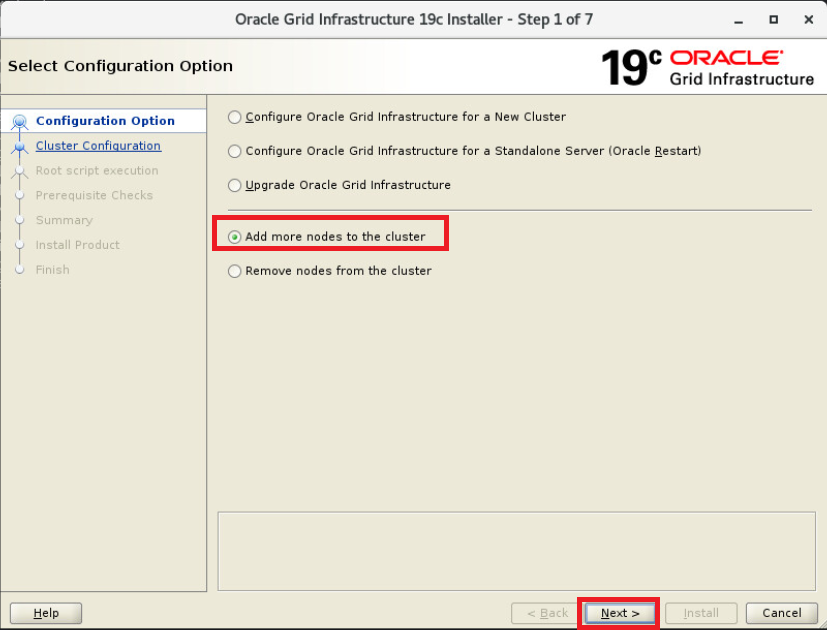
Add more nodes to the cluster 선택
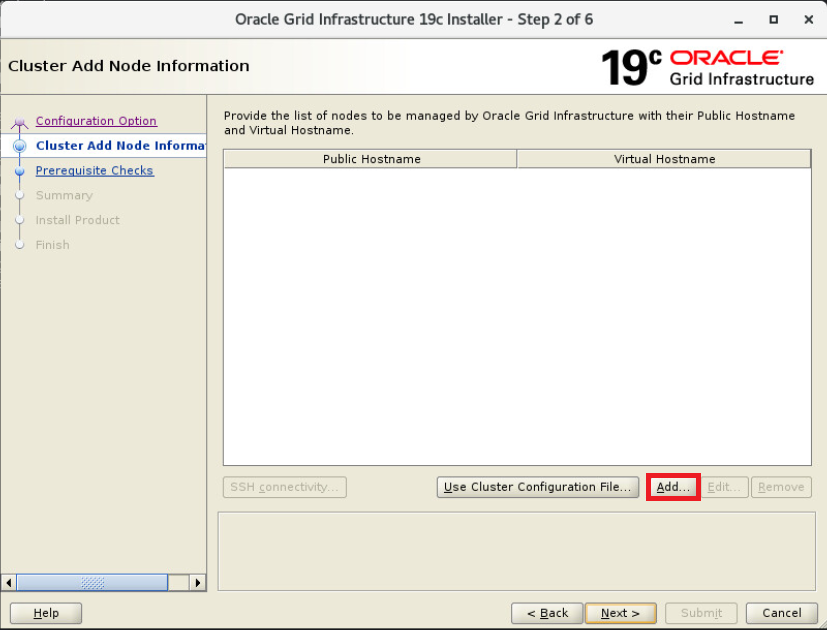
Add 선택
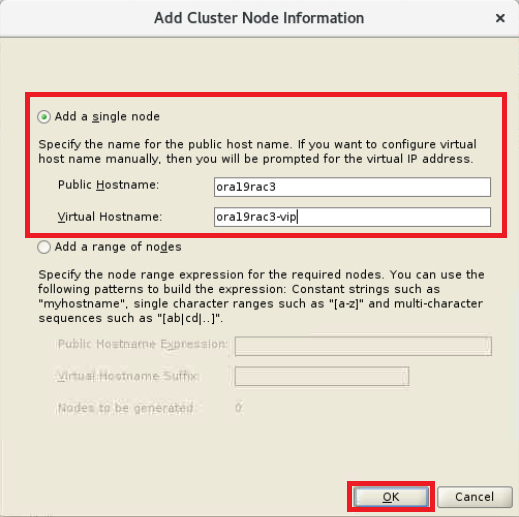
추가될 노드 정보 입력
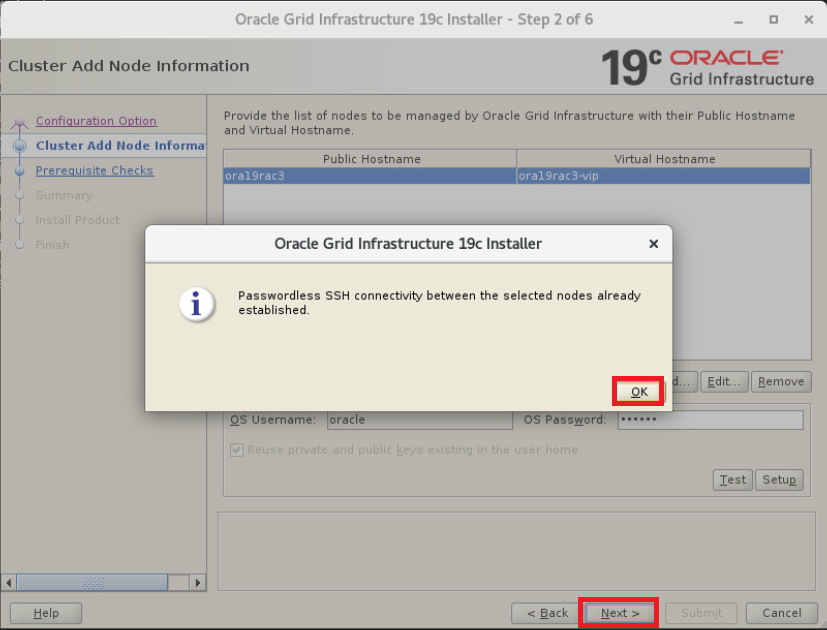
SSH connectivity 선택 후 패스워드 입력 및 Test 선택
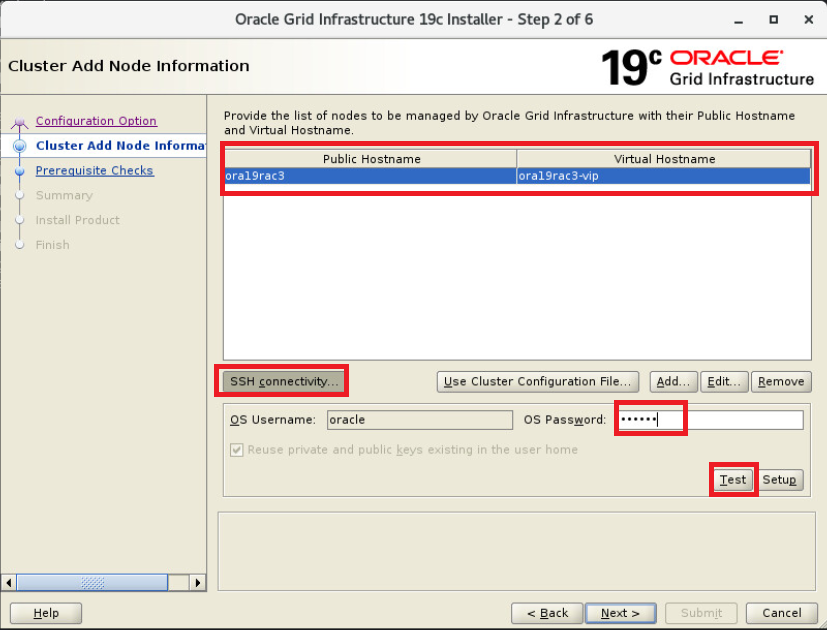
OK 선택
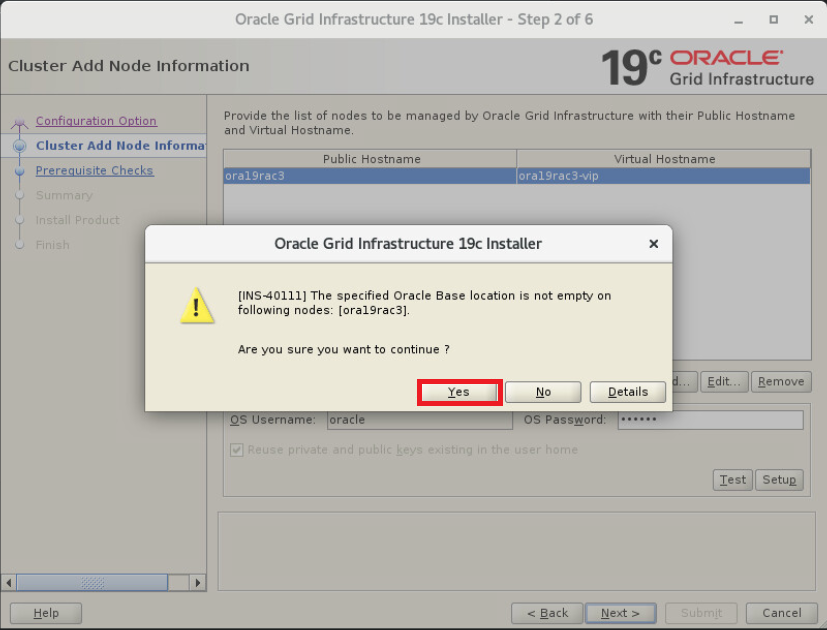
Yes 선택
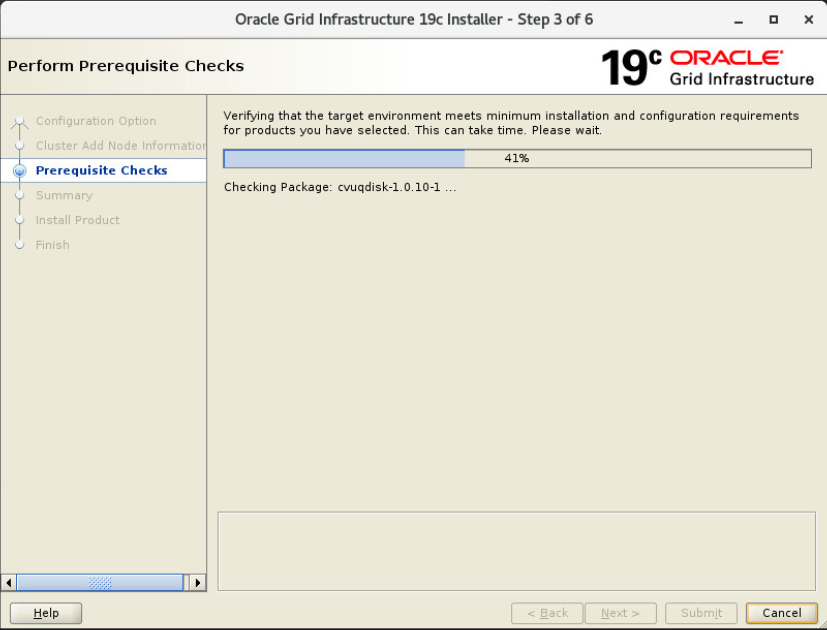
요구사항 체크중
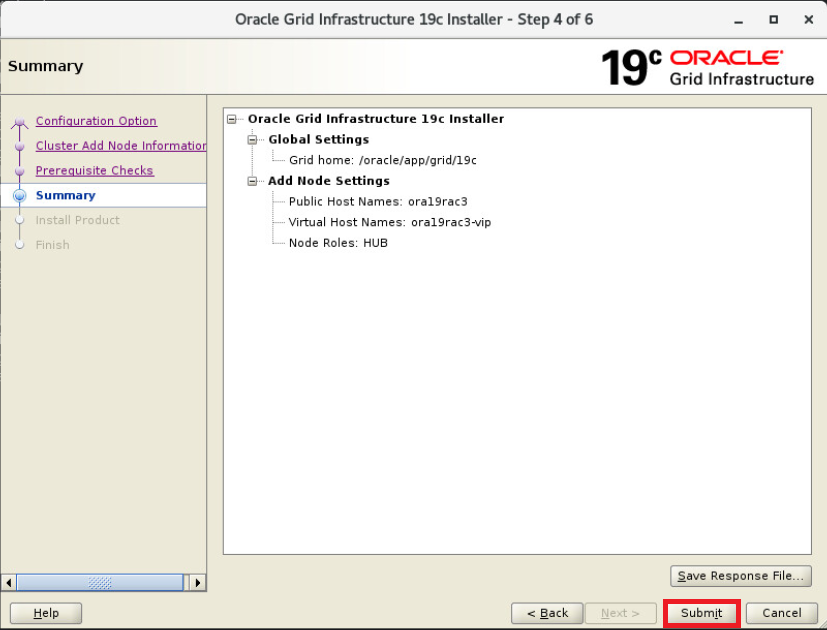
Summit 선택
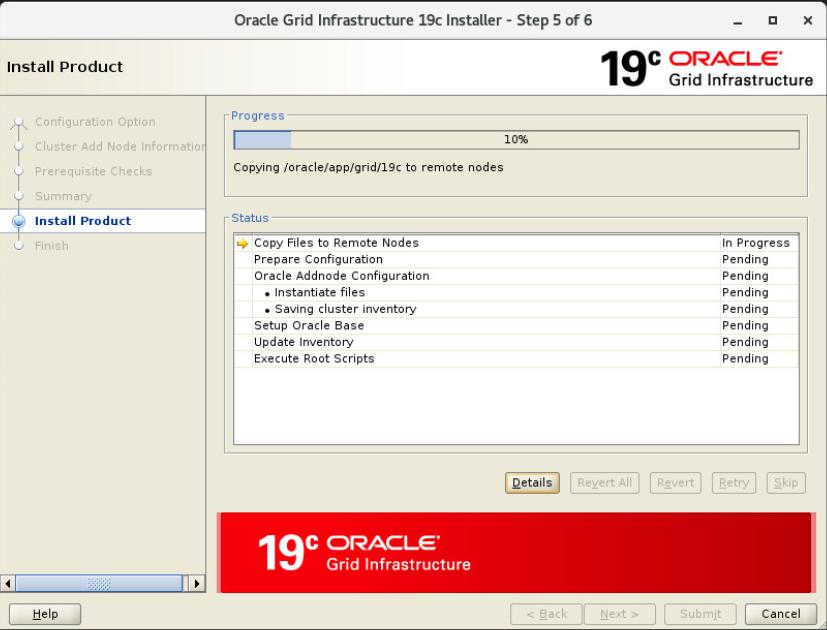
3번 노드에 grid 복제중
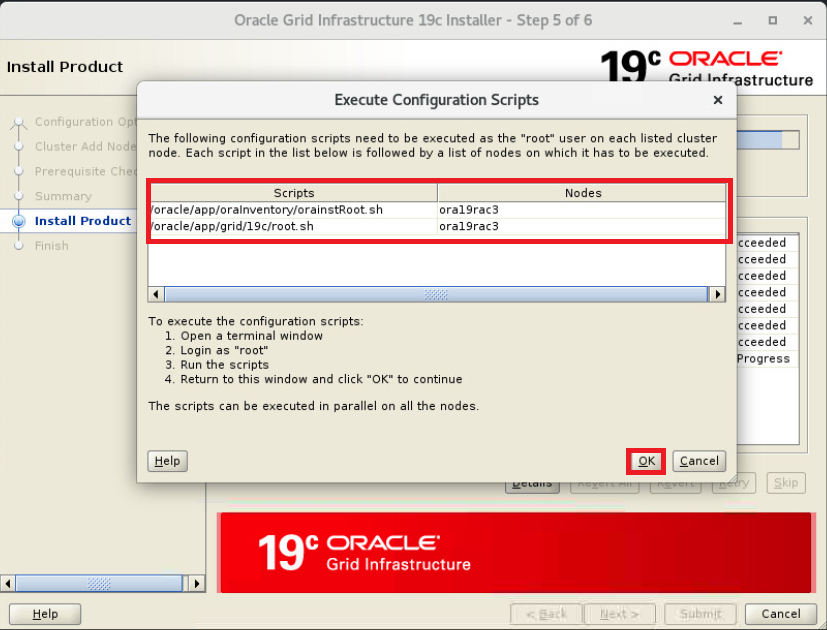
아래 표시된 스크립트 3번 노드의 root 계정에서 순차적으로 수행
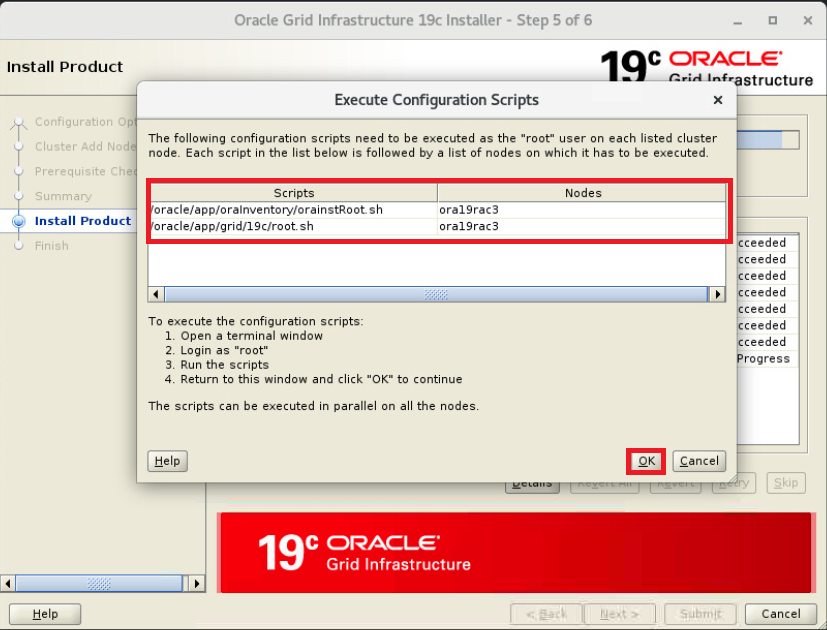
2가지 스크립트 root 유저로 수행(신규 노드에서 수행)
orainstRoot.sh 수행
|
1
2
3
4
5
6
7
|
# /oracle/app/oraInventory/orainstRoot.sh
Changing permissions of /oracle/app/oraInventory.
Adding read,write permissions for group.
Removing read,write,execute permissions for world.
Changing groupname of /oracle/app/oraInventory to oinstall.
The execution of the script is complete.
|
root.sh 수행
|
1
2
3
4
5
6
7
8
9
10
11
12
13
14
15
16
17
18
19
20
21
22
23
24
25
26
27
28
29
30
31
32
33
34
35
36
37
38
39
40
41
42
43
44
45
46
47
48
49
50
|
# /oracle/app/grid/19c/root.sh
Performing root user operation.
The following environment variables are set as:
ORACLE_OWNER= oracle
ORACLE_HOME= /oracle/app/grid/19c
Enter the full pathname of the local bin directory: [/usr/local/bin]:
Copying dbhome to /usr/local/bin ...
Copying oraenv to /usr/local/bin ...
Copying coraenv to /usr/local/bin ...
Creating /etc/oratab file...
Entries will be added to the /etc/oratab file as needed by
Database Configuration Assistant when a database is created
Finished running generic part of root script.
Now product-specific root actions will be performed.
Relinking oracle with rac_on option
Using configuration parameter file: /oracle/app/grid/19c/crs/install/crsconfig_params
The log of current session can be found at:
/oracle/app/oracle/crsdata/ora19rac3/crsconfig/rootcrs_ora19rac3_2025-07-13_00-04-13AM.log
2025/07/13 00:04:16 CLSRSC-594: Executing installation step 1 of 19: 'ValidateEnv'.
2025/07/13 00:04:17 CLSRSC-594: Executing installation step 2 of 19: 'CheckFirstNode'.
2025/07/13 00:04:17 CLSRSC-594: Executing installation step 3 of 19: 'GenSiteGUIDs'.
2025/07/13 00:04:19 CLSRSC-594: Executing installation step 4 of 19: 'SetupOSD'.
Redirecting to /bin/systemctl restart rsyslog.service
2025/07/13 00:04:19 CLSRSC-594: Executing installation step 5 of 19: 'CheckCRSConfig'.
2025/07/13 00:04:21 CLSRSC-594: Executing installation step 6 of 19: 'SetupLocalGPNP'.
2025/07/13 00:04:22 CLSRSC-594: Executing installation step 7 of 19: 'CreateRootCert'.
2025/07/13 00:04:22 CLSRSC-594: Executing installation step 8 of 19: 'ConfigOLR'.
2025/07/13 00:04:33 CLSRSC-594: Executing installation step 9 of 19: 'ConfigCHMOS'.
2025/07/13 00:04:33 CLSRSC-594: Executing installation step 10 of 19: 'CreateOHASD'.
2025/07/13 00:04:35 CLSRSC-594: Executing installation step 11 of 19: 'ConfigOHASD'.
2025/07/13 00:04:43 CLSRSC-330: Adding Clusterware entries to file 'oracle-ohasd.service'
2025/07/13 00:05:05 CLSRSC-594: Executing installation step 12 of 19: 'SetupTFA'.
2025/07/13 00:05:05 CLSRSC-594: Executing installation step 13 of 19: 'InstallAFD'.
2025/07/13 00:05:05 CLSRSC-594: Executing installation step 14 of 19: 'InstallACFS'.
2025/07/13 00:05:39 CLSRSC-594: Executing installation step 15 of 19: 'InstallKA'.
2025/07/13 00:05:41 CLSRSC-594: Executing installation step 16 of 19: 'InitConfig'.
2025/07/13 00:05:49 CLSRSC-594: Executing installation step 17 of 19: 'StartCluster'.
2025/07/13 00:07:40 CLSRSC-4002: Successfully installed Oracle Trace File Analyzer (TFA) Collector.
2025/07/13 00:07:54 CLSRSC-343: Successfully started Oracle Clusterware stack
2025/07/13 00:07:54 CLSRSC-594: Executing installation step 18 of 19: 'ConfigNode'.
clscfg: EXISTING configuration version 19 detected.
Successfully accumulated necessary OCR keys.
Creating OCR keys for user 'root', privgrp 'root'..
Operation successful.
2025/07/13 00:08:26 CLSRSC-594: Executing installation step 19 of 19: 'PostConfig'.
2025/07/13 00:09:08 CLSRSC-325: Configure Oracle Grid Infrastructure for a Cluster ... succeeded
|
수행 완료 후 OK 선택
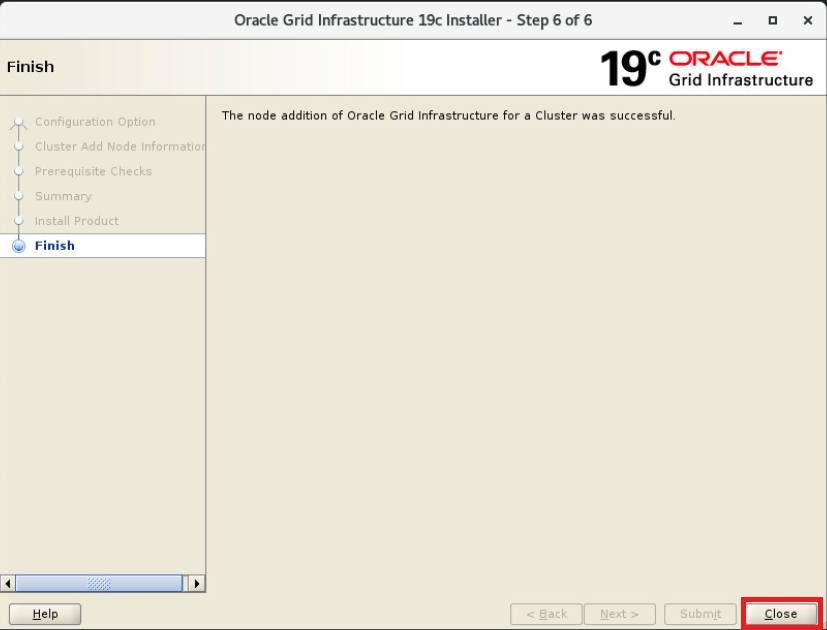
Close 선택
crs 상태 확인
|
1
2
3
4
5
6
7
8
9
10
11
12
13
14
15
16
17
18
19
20
21
22
23
24
25
26
27
28
29
30
31
32
33
34
35
36
37
38
39
40
41
42
43
44
45
46
47
48
49
50
51
52
53
54
55
56
57
58
59
60
61
62
63
64
65
66
67
68
69
70
71
72
73
74
75
76
77
78
79
80
81
82
83
84
85
86
|
# crsctl stat res -t
--------------------------------------------------------------------------------
Name Target State Server State details
--------------------------------------------------------------------------------
Local Resources
--------------------------------------------------------------------------------
ora.LISTENER.lsnr
ONLINE ONLINE ora19rac1 STABLE
ONLINE ONLINE ora19rac2 STABLE
ONLINE ONLINE ora19rac3 STABLE
ora.chad
ONLINE ONLINE ora19rac1 STABLE
ONLINE ONLINE ora19rac2 STABLE
ONLINE ONLINE ora19rac3 STABLE
ora.net1.network
ONLINE ONLINE ora19rac1 STABLE
ONLINE ONLINE ora19rac2 STABLE
ONLINE ONLINE ora19rac3 STABLE
ora.ons
ONLINE ONLINE ora19rac1 STABLE
ONLINE ONLINE ora19rac2 STABLE
ONLINE ONLINE ora19rac3 STABLE
ora.proxy_advm
OFFLINE OFFLINE ora19rac1 STABLE
OFFLINE OFFLINE ora19rac2 STABLE
OFFLINE OFFLINE ora19rac3 STABLE
--------------------------------------------------------------------------------
Cluster Resources
--------------------------------------------------------------------------------
ora.ASMNET1LSNR_ASM.lsnr(ora.asmgroup)
1 ONLINE ONLINE ora19rac1 STABLE
2 ONLINE ONLINE ora19rac2 STABLE
3 ONLINE ONLINE ora19rac3 STABLE
ora.DATA.dg(ora.asmgroup)
1 ONLINE ONLINE ora19rac1 STABLE
2 ONLINE ONLINE ora19rac2 STABLE
3 ONLINE ONLINE ora19rac3 STABLE
ora.LISTENER_SCAN1.lsnr
1 ONLINE ONLINE ora19rac1 STABLE
ora.OCR.dg(ora.asmgroup)
1 ONLINE ONLINE ora19rac1 STABLE
2 ONLINE ONLINE ora19rac2 STABLE
3 ONLINE ONLINE ora19rac3 STABLE
ora.RECO.dg(ora.asmgroup)
1 ONLINE ONLINE ora19rac1 STABLE
2 ONLINE ONLINE ora19rac2 STABLE
3 ONLINE ONLINE ora19rac3 STABLE
ora.VOTE.dg(ora.asmgroup)
1 ONLINE ONLINE ora19rac1 STABLE
2 ONLINE ONLINE ora19rac2 STABLE
3 ONLINE ONLINE ora19rac3 STABLE
ora.asm(ora.asmgroup)
1 ONLINE ONLINE ora19rac1 Started,STABLE
2 ONLINE ONLINE ora19rac2 Started,STABLE
3 ONLINE ONLINE ora19rac3 Started,STABLE
ora.asmnet1.asmnetwork(ora.asmgroup)
1 ONLINE ONLINE ora19rac1 STABLE
2 ONLINE ONLINE ora19rac2 STABLE
3 ONLINE ONLINE ora19rac3 STABLE
ora.cvu
1 ONLINE ONLINE ora19rac1 STABLE
ora.ora11db.db
1 ONLINE ONLINE ora19rac1 Open,HOME=/oracle/ap
p/oracle/product/19c
,STABLE
2 ONLINE ONLINE ora19rac2 Open,HOME=/oracle/ap
p/oracle/product/19c
,STABLE
ora.ora19db.db
1 ONLINE ONLINE ora19rac1 Open,HOME=/oracle/ap
p/oracle/product/19c
,STABLE
2 ONLINE ONLINE ora19rac2 Open,HOME=/oracle/ap
p/oracle/product/19c
,STABLE
ora.ora19rac1.vip
1 ONLINE ONLINE ora19rac1 STABLE
ora.ora19rac2.vip
1 ONLINE ONLINE ora19rac2 STABLE
ora.ora19rac3.vip
1 ONLINE ONLINE ora19rac3 STABLE
ora.qosmserver
1 ONLINE ONLINE ora19rac1 STABLE
ora.scan1.vip
1 ONLINE ONLINE ora19rac1 STABLE
--------------------------------------------------------------------------------
|
각 리소스에 신규 3번 노드가 추가됨, db는 아직 2번 노드까지만 존재함
db 노드 추가(gui)(1번 노드에서 수행)
|
1
2
|
$ cd $ORACLE_HOME/addnode
$ ./addnode.sh "CLUSTER_NEW_NODES=ora19rac3"
|
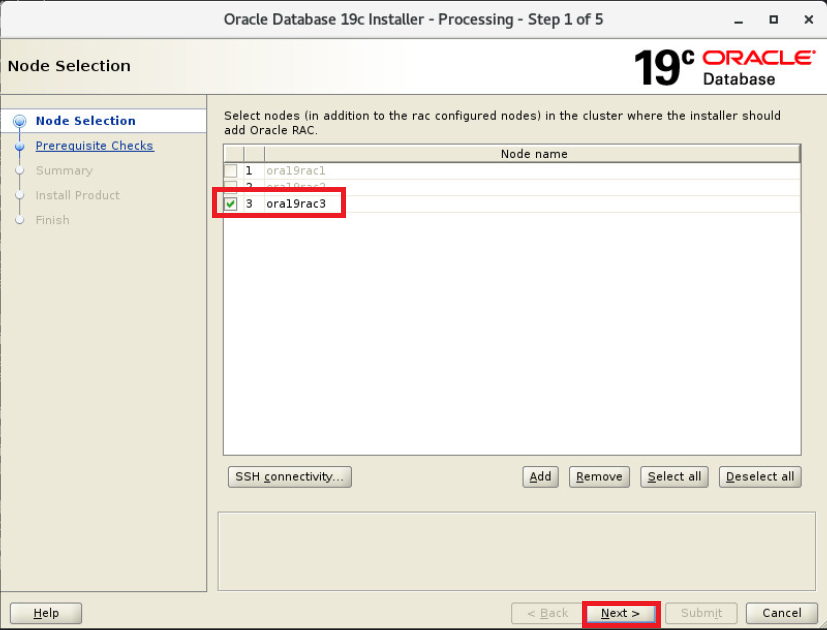
3번 노드 선택 후 Next
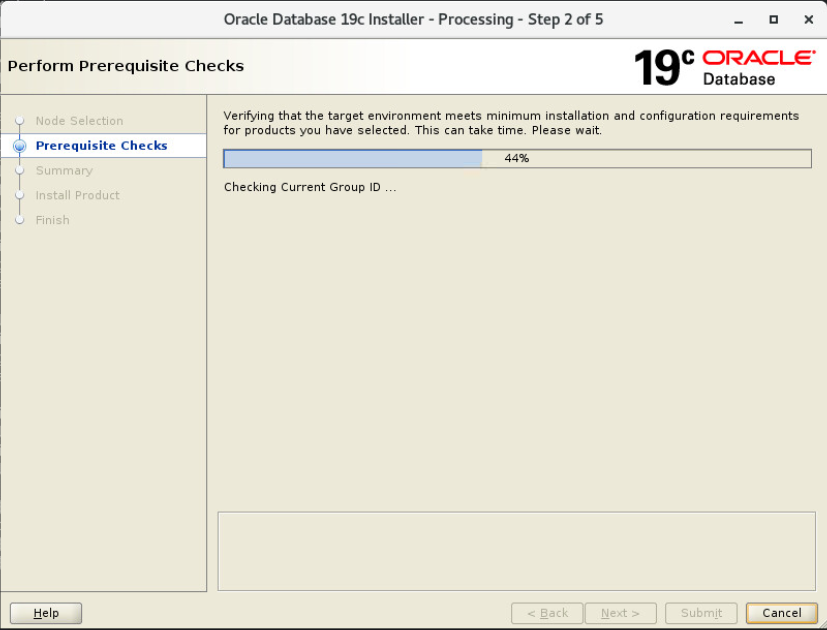
요구사항 체크중
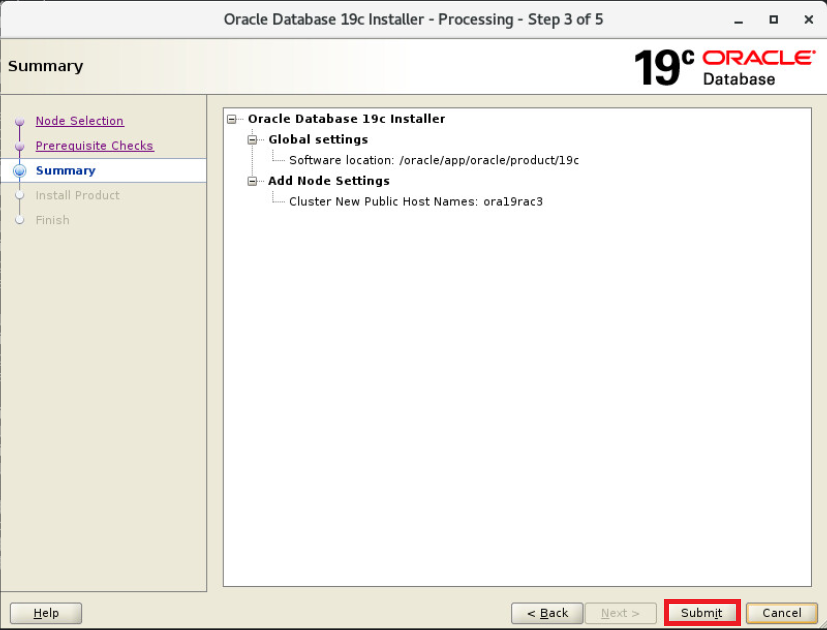
Summit 선택
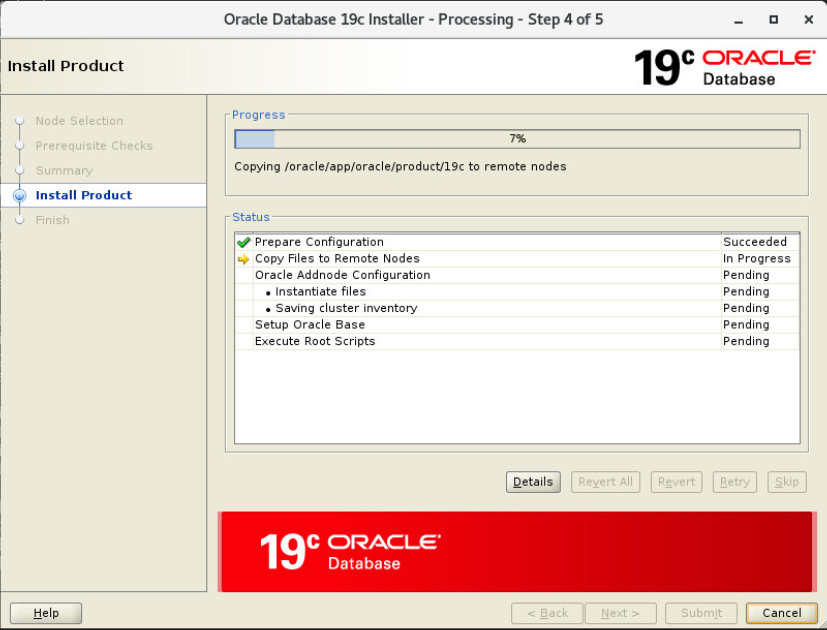
db 엔진 복제중
3번 노드에서 root 유저로 스크립트 수행
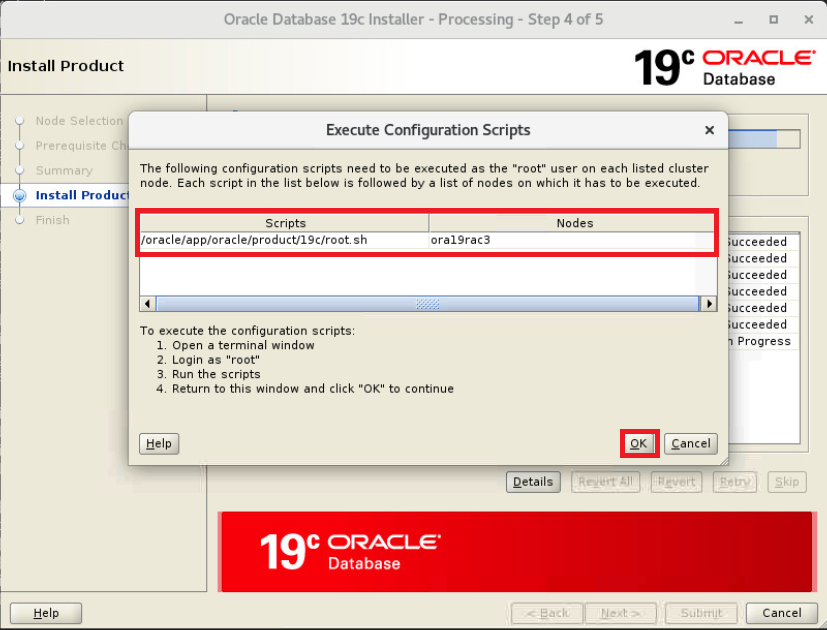
스크립트 root 유저로 수행(신규 노드에서 수행)
|
1
2
3
4
5
6
7
8
9
10
11
12
13
14
15
16
|
# /oracle/app/oracle/product/19c/root.sh
Performing root user operation.
The following environment variables are set as:
ORACLE_OWNER= oracle
ORACLE_HOME= /oracle/app/oracle/product/19c
Enter the full pathname of the local bin directory: [/usr/local/bin]:
The contents of "dbhome" have not changed. No need to overwrite.
The contents of "oraenv" have not changed. No need to overwrite.
The contents of "coraenv" have not changed. No need to overwrite.
Entries will be added to the /etc/oratab file as needed by
Database Configuration Assistant when a database is created
Finished running generic part of root script.
Now product-specific root actions will be performed.
|
수행 완료 후 OK 선택
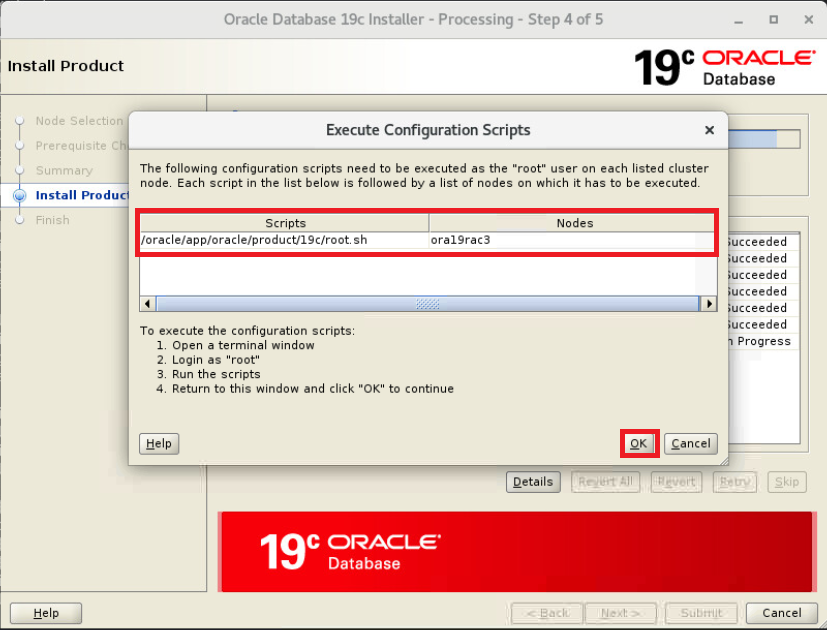
Close 선택
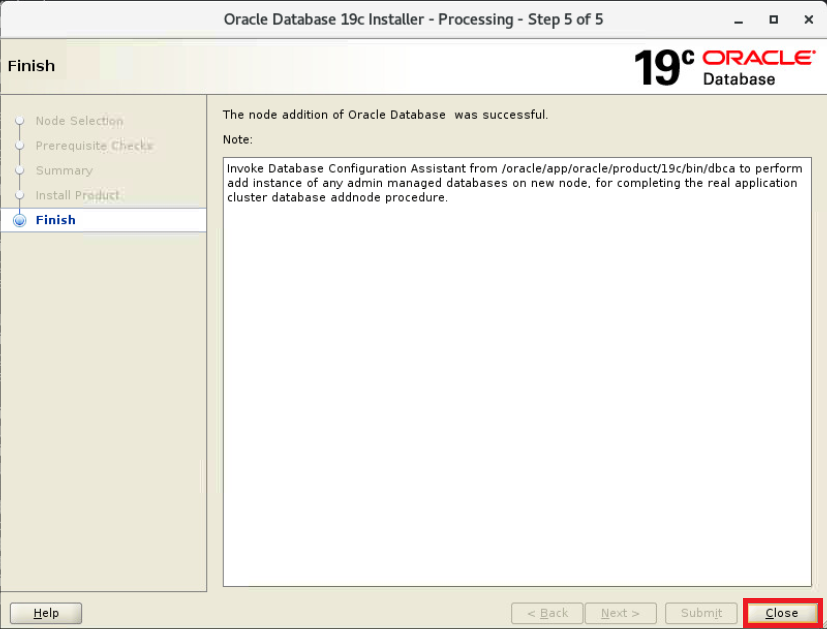
grid에 인스턴스 추가(gui)(1번 노드에서 수행)
|
1
2
|
$ cd $ORACLE_HOME/bin/
$ ./dbca
|
Oracle RAC database instance management 선택
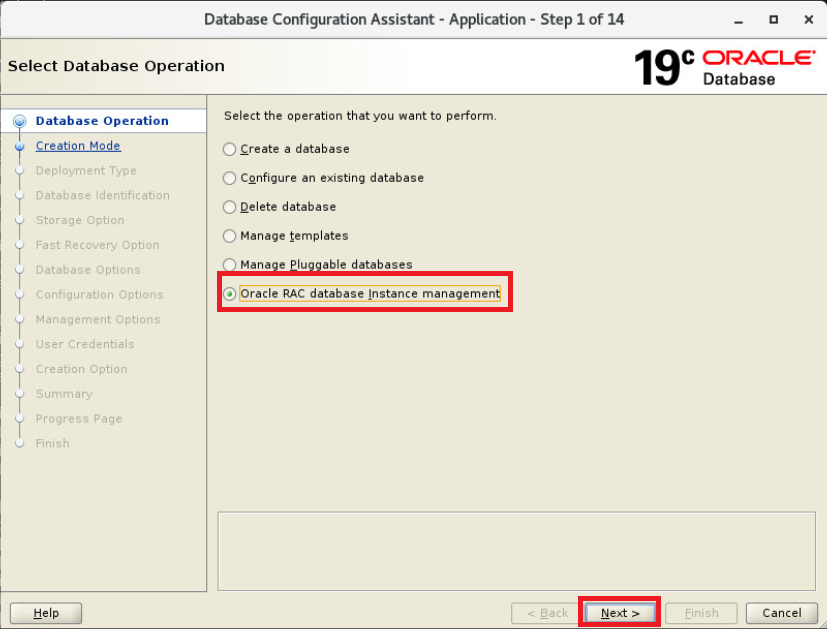
Add an instance 선택
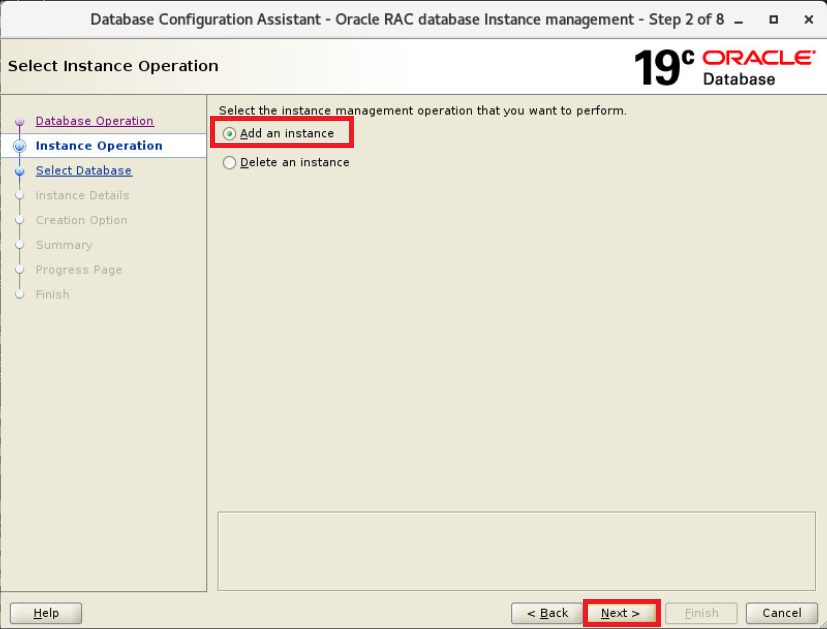
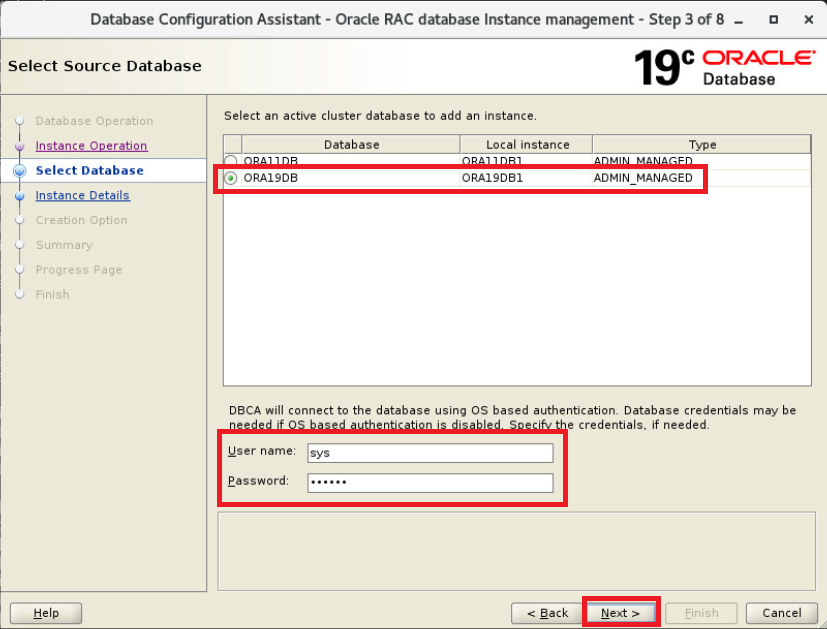
ORA19DB 선택 후 sys 계정 및 패스워드 입력 후 Next
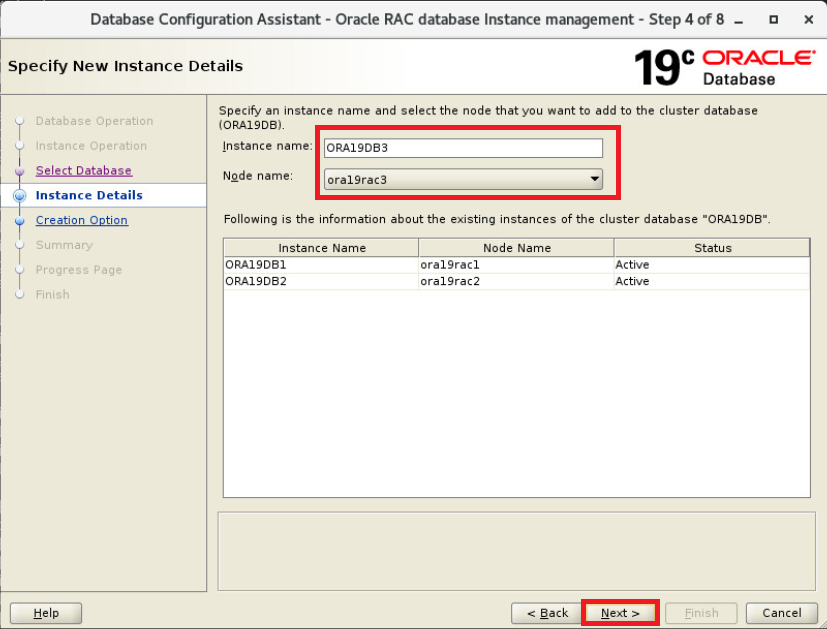
인스턴스 이름 작성 후 Next
Finish 선택
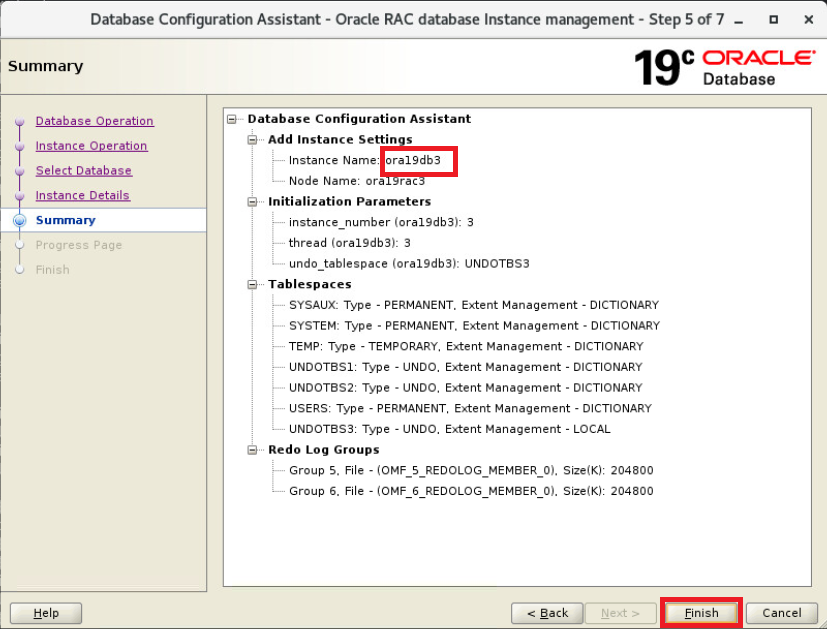
분명 이전페이지에서 대문자로 인스턴스 이름을 작성했지만 Summary에는 소문자로 표시됨
인스턴스 추가중
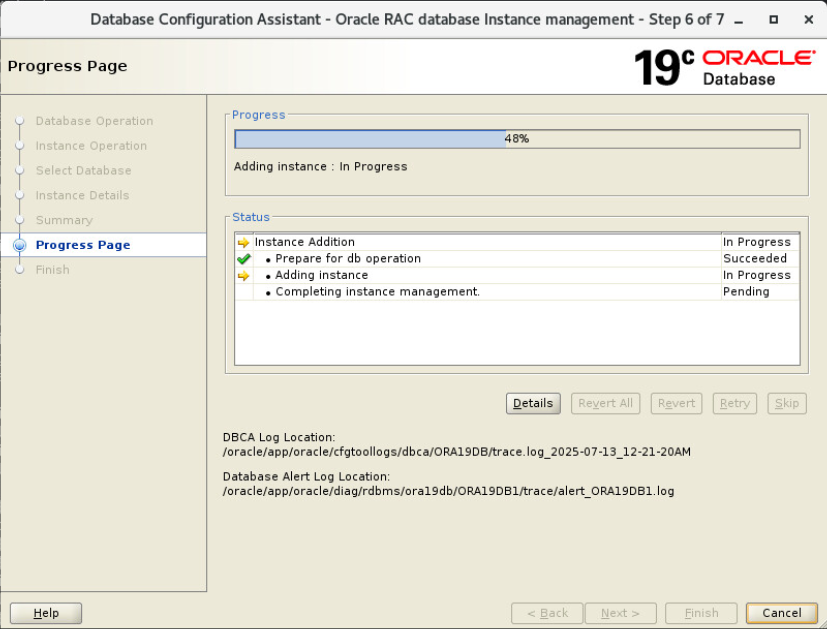
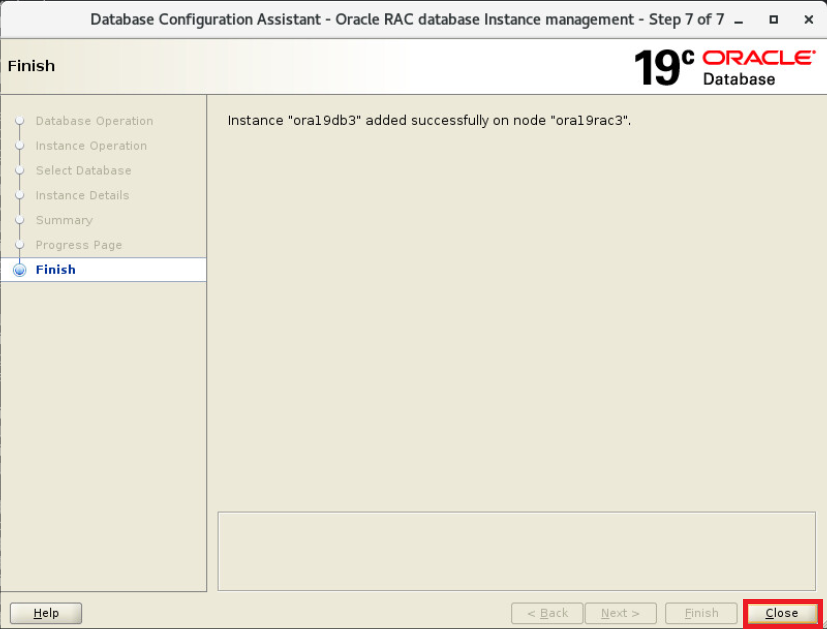
Close 선택
crs 상태 확인
|
1
2
3
4
5
6
7
8
9
10
11
12
13
14
15
16
17
18
19
20
21
22
23
24
25
26
27
28
29
30
31
32
33
34
35
36
37
38
39
40
41
42
43
44
45
46
47
48
49
50
51
52
53
54
55
56
57
58
59
60
61
62
63
64
65
66
67
68
69
70
71
72
73
74
75
76
77
78
79
80
81
82
83
84
85
86
87
88
89
|
# crsctl stat res -t
--------------------------------------------------------------------------------
Name Target State Server State details
--------------------------------------------------------------------------------
Local Resources
--------------------------------------------------------------------------------
ora.LISTENER.lsnr
ONLINE ONLINE ora19rac1 STABLE
ONLINE ONLINE ora19rac2 STABLE
ONLINE ONLINE ora19rac3 STABLE
ora.chad
ONLINE ONLINE ora19rac1 STABLE
ONLINE ONLINE ora19rac2 STABLE
ONLINE ONLINE ora19rac3 STABLE
ora.net1.network
ONLINE ONLINE ora19rac1 STABLE
ONLINE ONLINE ora19rac2 STABLE
ONLINE ONLINE ora19rac3 STABLE
ora.ons
ONLINE ONLINE ora19rac1 STABLE
ONLINE ONLINE ora19rac2 STABLE
ONLINE ONLINE ora19rac3 STABLE
ora.proxy_advm
OFFLINE OFFLINE ora19rac1 STABLE
OFFLINE OFFLINE ora19rac2 STABLE
OFFLINE OFFLINE ora19rac3 STABLE
--------------------------------------------------------------------------------
Cluster Resources
--------------------------------------------------------------------------------
ora.ASMNET1LSNR_ASM.lsnr(ora.asmgroup)
1 ONLINE ONLINE ora19rac1 STABLE
2 ONLINE ONLINE ora19rac2 STABLE
3 ONLINE ONLINE ora19rac3 STABLE
ora.DATA.dg(ora.asmgroup)
1 ONLINE ONLINE ora19rac1 STABLE
2 ONLINE ONLINE ora19rac2 STABLE
3 ONLINE ONLINE ora19rac3 STABLE
ora.LISTENER_SCAN1.lsnr
1 ONLINE ONLINE ora19rac1 STABLE
ora.OCR.dg(ora.asmgroup)
1 ONLINE ONLINE ora19rac1 STABLE
2 ONLINE ONLINE ora19rac2 STABLE
3 ONLINE ONLINE ora19rac3 STABLE
ora.RECO.dg(ora.asmgroup)
1 ONLINE ONLINE ora19rac1 STABLE
2 ONLINE ONLINE ora19rac2 STABLE
3 ONLINE ONLINE ora19rac3 STABLE
ora.VOTE.dg(ora.asmgroup)
1 ONLINE ONLINE ora19rac1 STABLE
2 ONLINE ONLINE ora19rac2 STABLE
3 ONLINE ONLINE ora19rac3 STABLE
ora.asm(ora.asmgroup)
1 ONLINE ONLINE ora19rac1 Started,STABLE
2 ONLINE ONLINE ora19rac2 Started,STABLE
3 ONLINE ONLINE ora19rac3 Started,STABLE
ora.asmnet1.asmnetwork(ora.asmgroup)
1 ONLINE ONLINE ora19rac1 STABLE
2 ONLINE ONLINE ora19rac2 STABLE
3 ONLINE ONLINE ora19rac3 STABLE
ora.cvu
1 ONLINE ONLINE ora19rac1 STABLE
ora.ora11db.db
1 ONLINE ONLINE ora19rac1 Open,HOME=/oracle/ap
p/oracle/product/19c
,STABLE
2 ONLINE ONLINE ora19rac2 Open,HOME=/oracle/ap
p/oracle/product/19c
,STABLE
ora.ora19db.db
1 ONLINE ONLINE ora19rac1 Open,HOME=/oracle/ap
p/oracle/product/19c
,STABLE
2 ONLINE ONLINE ora19rac2 Open,HOME=/oracle/ap
p/oracle/product/19c
,STABLE
3 ONLINE ONLINE ora19rac3 Open,HOME=/oracle/ap
p/oracle/product/19c
,STABLE
ora.ora19rac1.vip
1 ONLINE ONLINE ora19rac1 STABLE
ora.ora19rac2.vip
1 ONLINE ONLINE ora19rac2 STABLE
ora.ora19rac3.vip
1 ONLINE ONLINE ora19rac3 STABLE
ora.qosmserver
1 ONLINE ONLINE ora19rac1 STABLE
ora.scan1.vip
1 ONLINE ONLINE ora19rac1 STABLE
--------------------------------------------------------------------------------
|
ora19db에 3번 인스턴스가 정상적으로 추가됨, 업그레이드 테스트시 사용한 ora11db도 존재하지만 본문에서는 ora19db에만 인스턴스를 추가함
db 구성 상태 확인
|
1
2
3
4
5
6
7
8
9
10
11
12
13
14
15
16
17
18
19
20
21
22
23
24
25
26
27
28
29
|
$ srvctl config database -d ora19db
Database unique name: ORA19DB
Database name: ORA19DB
Oracle home: /oracle/app/oracle/product/19c
Oracle user: oracle
Spfile: +DATA/ORA19DB/PARAMETERFILE/spfile.294.1203586513
Password file: +DATA/ORA19DB/PASSWORD/pwdora19db.270.1201188441
Domain:
Start options: open
Stop options: immediate
Database role: PRIMARY
Management policy: AUTOMATIC
Server pools:
Disk Groups: DATA
Mount point paths:
Services:
Type: RAC
Start concurrency:
Stop concurrency:
OSDBA group: dba
OSOPER group: dba
Database instances: ORA19DB1,ORA19DB2,ora19db3
Configured nodes: ora19rac1,ora19rac2,ora19rac3
CSS critical: no
CPU count: 0
Memory target: 0
Maximum memory: 0
Default network number for database services:
Database is administrator managed
|
정상적으로 3번 노드도 추가됨, 다만 3번 노드 인스턴스 명이 소문자로 추가됨
결론 :
본문과 같은 gui 방식으로도 rac 환경에서 노드 추가 작업을 온라인으로 진행할 수 있음
참조 :
https://docs.oracle.com/en/database/oracle/oracle-database/19/cwadd/adding-and-deleting-cluster-nodes.html#GUID-929C0CD9-9B67-45D6-B864-5ED3B47FE458
https://docs.oracle.com/en/database/oracle/oracle-database/19/cwadd/adding-and-deleting-cluster-nodes.html#GUID-25D8D7A2-5240-401F-A998-00C4B525413F
https://jack-of-all-trades.tistory.com/447
https://pskbigstar.tistory.com/entry/RAC-노드-추가OU
https://gyh214.tistory.com/entry/RAC%EC%9A%B4%EC%98%81%EC%A4%91-RAC-node-%EC%B6%94%EA%B0%80%ED%95%98%EA%B8%B013-%ED%99%98%EA%B2%BD-VMware-%EC%8B%A4%EC%8A%B5%ED%99%98%EA%B2%BD-11gR2-OEL2618-238el5PAE
https://gyh214.tistory.com/entry/RAC%EC%9A%B4%EC%98%81%EC%A4%91-RAC-node-%EC%B6%94%EA%B0%80%ED%95%98%EA%B8%B023-%ED%99%98%EA%B2%BD-VMware-%EC%8B%A4%EC%8A%B5%ED%99%98%EA%B2%BD-11gR2-OEL2618-238el5PAE
https://gyh214.tistory.com/entry/RAC%EC%9A%B4%EC%98%81%EC%A4%91-RAC-node-%EC%B6%94%EA%B0%80%ED%95%98%EA%B8%B033-%ED%99%98%EA%B2%BD-VMware-%EC%8B%A4%EC%8A%B5%ED%99%98%EA%B2%BD-11gR2-OEL2618-238el5PAE
RAC: How to delete and add a node in 19c RAC (Doc ID 3019970.1)
https://positivemh.tistory.com/307
https://positivemh.tistory.com/761
https://positivemh.tistory.com/306
'ORACLE > Rac' 카테고리의 다른 글
| 오라클 19c vote 디스크 위치 변경 방법 (17) | 2025.07.19 |
|---|---|
| 오라클 19c RAC 노드 제거 방법(gui) (0) | 2025.07.13 |
| 오라클 19c RAC 노드 제거 방법(silent) (0) | 2025.07.13 |
| 오라클 19c RAC 노드 추가 방법(silent) (0) | 2025.07.13 |
| 오라클 19c Private IP 정지 후 fencing, evict 확인 테스트 (0) | 2025.07.04 |