

OS 환경 : Oracle Linux 8.7, 8.8 (64bit)
DB 환경 : Oracle Database 19.27.0.0
에러 : Linux 8.7에 oracleasmlib 및 oracleasm-support 사용시 발생하는 에러
Oracle Linux 8.7에서 oracleasmlib 및 oracleasm-support 패키지를 설치한 뒤 init 명령을 사용하면 Loading module "oracleasm": failed 에러가 발생함
이때의 조치방법을 설명함
Oracle Linux 8.7에서 정상적으로 oracle asm 패키지들을 설치
|
1
2
3
4
5
6
7
8
|
# rpm -ivh /root/oracleasmlib-2.0.17-1.el8.x86_64.rpm
Verifying... ################################# [100%]
Preparing... ################################# [100%]
package oracleasmlib-2.0.17-1.el8.x86_64 is already installed
# rpm -ivh /root/oracleasm-support-2.1.12-1.el8.x86_64.rpm
Verifying... ################################# [100%]
Preparing... ################################# [100%]
package oracleasm-support-2.1.12-1.el8.x86_64 is already installed
|
oracleasm init 명령 입력시 계속 failed가 발생
|
1
2
3
4
5
|
# oracleasm init
Loading module "oracleasm": failed
Unable to load module "oracleasm"
Mounting ASMlib driver filesystem: failed
Unable to mount ASMlib driver filesystem
|
기존 8버전대 rpm 제거 후 7버전대 rpm 설치하면 된다는 말이있어서 해봤지만 안됨
8버전대 rpm 제거
|
1
2
|
# rpm -e oracleasmlib-2.0.17-1.el8.x86_64
# rpm -e oracleasm-support-2.1.12-1.el8.x86_64
|
7버전대 rpm 설치
|
1
2
3
4
5
6
7
8
9
10
11
12
13
14
15
|
# rpm -ivh oracleasmlib-2.0.12-1.el7.x86_64.rpm
warning: oracleasmlib-2.0.12-1.el7.x86_64.rpm: Header V3 RSA/SHA256 Signature, key ID ec551f03: NOKEY
Verifying... ################################# [100%]
Preparing... ################################# [100%]
Updating / installing...
1:oracleasmlib-2.0.12-1.el7 ################################# [100%]
# rpm -ivh oracleasm-support-2.1.11-2.el7.x86_64.rpm
warning: oracleasm-support-2.1.11-2.el7.x86_64.rpm: Header V3 RSA/SHA256 Signature, key ID ec551f03: NOKEY
Verifying... ################################# [100%]
Preparing... ################################# [100%]
Updating / installing...
1:oracleasm-support-2.1.11-2.el7 ################################# [100%]
Note: Forwarding request to 'systemctl enable oracleasm.service'.
Synchronizing state of oracleasm.service with SysV service script with /usr/lib/systemd/systemd-sysv-install.
Executing: /usr/lib/systemd/systemd-sysv-install enable oracleasm
|
설치 링크 : https://www.oracle.com/linux/downloads/linux-asmlib-rhel7-downloads.html
https://www.oracle.com/linux/downloads/linux-asmlib-v7-downloads.html
동일함
|
1
2
3
4
5
|
# oracleasm init
Loading module "oracleasm": failed
Unable to load module "oracleasm"
Mounting ASMlib driver filesystem: failed
Unable to mount ASMlib driver filesystem
|
참고로 이전에 Oracle Linux 8.4버전에 설치할때는 문제가 없었음
해결 방법 : 커널버전에 맞은 oracleasm lib 설치
공식 문서에 따르면 os가 8버전이 되긴 하지만 커널 버전에 따라 조금 다르게 적혀있음
|
1
2
3
4
5
|
Operating System Checklist for Oracle Grid Infrastructure and Oracle RAC
Operating system general requirements
Oracle Linux 8.8 with the Unbreakable Enterprise Kernel 7: 5.15.0-202.135.2.el8uek.x86_64 or later
Oracle Linux 8.1 with the Unbreakable Enterprise Kernel 6: 5.4.17-2011.0.7.el8uek.x86_64 or later
Oracle Linux 8 with the Red Hat Compatible kernel: 4.18.0-80.el8.x86_64 or later
|
참고 : https://docs.oracle.com/en/database/oracle/oracle-database/19/cwlin/operating-system-checklist-for-oracle-grid-infrastructure-and-oracle-rac.html
8.1이상은 UEK(Unbreakable Enterprise Kernel) 버전 6에 5.4 이후여야함
grid 뿐만아니라 oracle db도 아래와 같이 적혀있음
|
1
2
3
4
5
6
7
8
|
Supported Oracle Linux 8 Distributions for x86-64
Table 4-2 x86-64 Oracle Linux 8 Minimum Operating System Requirements
Oracle Linux 8.1 with the Unbreakable Enterprise Kernel 6: 5.4.17-2011.0.7.el8uek.x86_64 or later
Oracle Linux 8 with the Red Hat Compatible Kernel: 4.18.0-80.el8.x86_64 or later
Starting with Oracle Database 19c Release 19.21, the following minimum version is supported:
Oracle Linux 8.8 with the Unbreakable Enterprise Kernel 7: 5.15.0-202.135.2.el8uek.x86_64 or later
Starting with Oracle Grid Infrastructure 19c Release 19.23, the following minimum version is supported:
Oracle Linux 8.8 with the Unbreakable Enterprise Kernel 7: 5.15.0-202.135.2.el8uek.x86_64 or later
|
grid나 db를 19.27을 설치하려 했기때문에 8.8 이상의 버전을 사용했어야함
그리고 8.8이상은 UEK(Unbreakable Enterprise Kernel) 버전 7에 5.14 이후여야함
리눅스 및 UEK(Unbreakable Enterprise Kernel) 버전 확인
|
1
2
3
4
5
|
# cat /etc/redhat-release
Red Hat Enterprise Linux release 8.7 (Ootpa)
# uname -a
Linux ora19a 5.15.0-3.60.5.1.el8uek.x86_64 #2 SMP Wed Oct 19 20:04:48 PDT 2022 x86_64 x86_64 x86_64 GNU/Linux
|
8.7에 5.15임
현재 8.7에 5.15인데 공식문서에선 5.15는 리눅스 8.8 이상이어야 된다고 적혀있음
OS를 8.8 이상으로 변경해야함
OS를 Oracle Linux 8.8로 재설치
8.8 설치 후 패키지 추가 설치
|
1
|
# dnf install -y libbpf*
|
oracleasm-support-2가 아닌 oracleasm-support-3 설치
|
1
2
3
4
5
6
7
8
9
10
|
# rpm -Uvh oracleasm-support-3.1.0-10.el8.x86_64.rpm
Verifying... ################################# [100%]
Preparing... ################################# [100%]
Updating / installing...
1:oracleasm-support-3.1.0-10.el8 warning: /etc/sysconfig/oracleasm created as /etc/sysconfig/oracleasm.rpmnew
################################# [ 50%]
Synchronizing state of oracleasm.service with SysV service script with /usr/lib/systemd/systemd-sysv-install.
Executing: /usr/lib/systemd/systemd-sysv-install enable oracleasm
Cleaning up / removing...
2:oracleasm-support-2.1.12-1.el8 ################################# [100%]
|
설치 링크 : https://yum.oracle.com/repo/OracleLinux/OL8/addons/x86_64/index.html
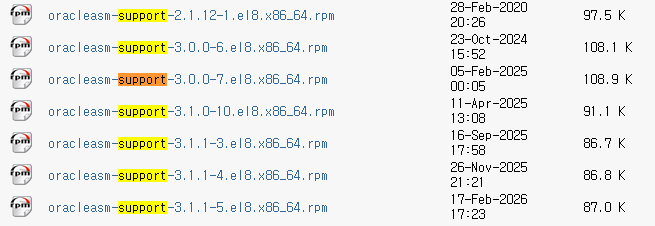
oracleasmlib도 3버전 설치
|
1
2
3
4
5
6
7
|
# rpm -Uvh oracleasmlib-3.1.0-6.el8.x86_64.rpm
Verifying... ################################# [100%]
Preparing... ################################# [100%]
Updating / installing...
1:oracleasmlib-3.1.0-6.el8 ################################# [ 50%]
Cleaning up / removing...
2:oracleasmlib-2.0.17-1.el8 ################################# [100%]
|
설치 링크 : https://www.oracle.com/linux/downloads/linux-asmlib-v8-downloads.html
다시 oracleasm init 명령어 수행
|
1
2
3
4
5
6
|
# oracleasm init
Mounting oracleasm driver filesystem: Not applicable with kernel 5.15.0
Reloading disk partitions: done
Cleaning any stale ASM disks...
Scanning system for ASM disks...
Disk scan successful
|
정상적으로 동작함
원인 : grid와 oracleasm 패키지의 os 및 커널 지원 문제
grid와 oracleasm 패키지의 os 및 커널 지원 문제
os를 8.8이상으로 설치한 뒤, oracleasm 패키지를 3버전대로 설치하면 정상적으로 사용가능함
참조 :
https://docs.oracle.com/en/database/oracle/oracle-database/19/cwlin/operating-system-checklist-for-oracle-grid-infrastructure-and-oracle-rac.html
https://docs.oracle.com/en/database/oracle/oracle-database/19/ladbi/supported-oracle-linux-8-distributions-for-x86-64.html
'Linux, Unix > Trouble Shooting' 카테고리의 다른 글
| 오라클 rpm 설치 시 발생하는 warning 메세지 (0) | 2025.08.31 |
|---|---|
| mv: setting attribute 'security.selinux' for 'security.selinux': Operation not permitted (0) | 2025.08.20 |
| Linux 7 Gui 실행 문제 No protocol specified (0) | 2025.06.04 |
| Creating mailbox file: File exists (0) | 2024.07.30 |
| [sss_cache] [sysdb_domain_cache_connect] (0x0010): DB version too old (0) | 2024.07.30 |